Release Notes

New features, improvements, and fixes. Here are the latest Tower updates!

Tower 10

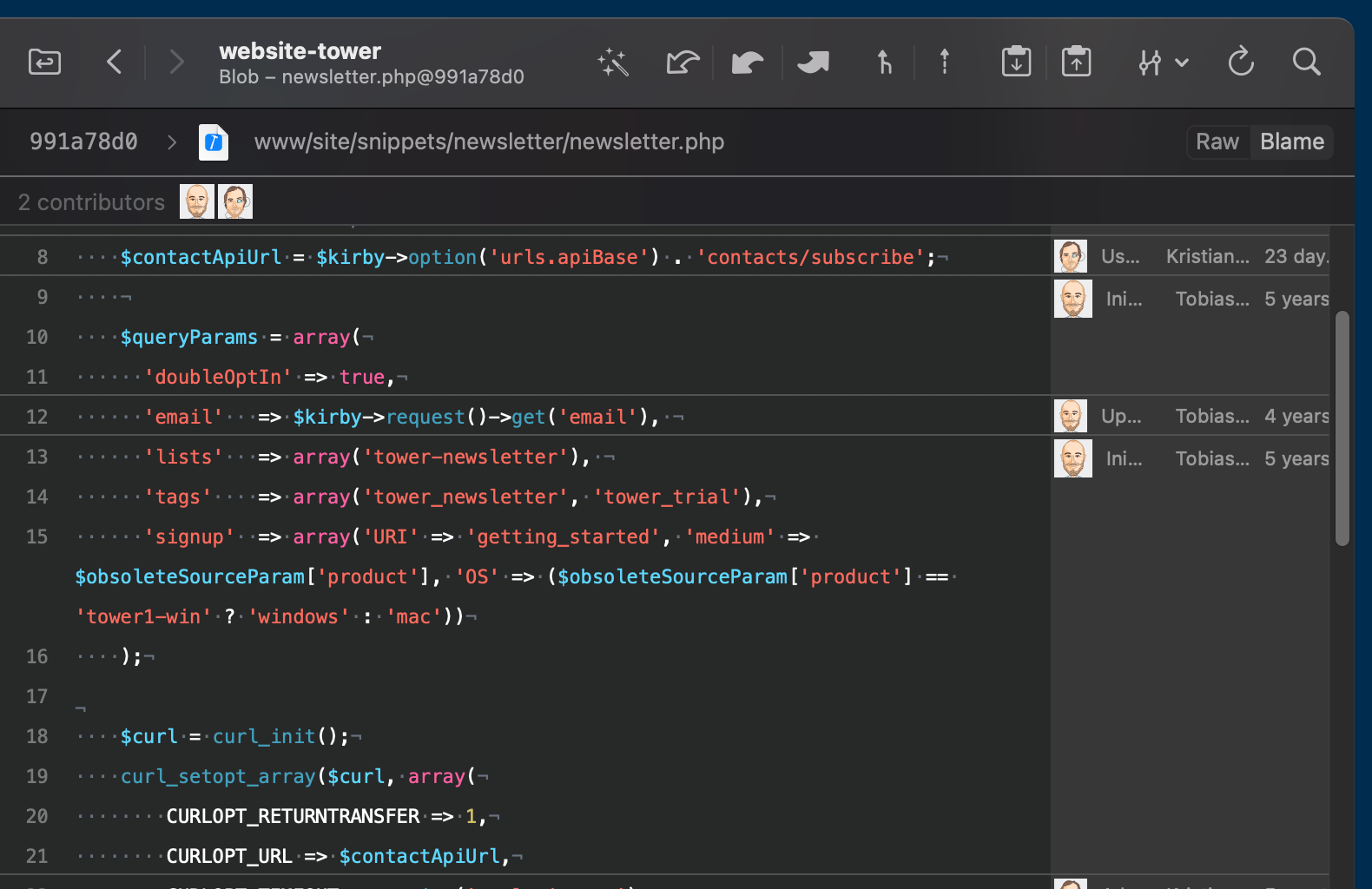
To celebrate this highly anticipated release in style, we're bringing a lot of color to your codebase!

What's New in Tower 10

  1. Syntax Coloring

    We're excited to introduce Syntax Coloring to your diff, raw, and blame views, providing support for nearly 200 languages. To enable this feature, simply navigate to the new "Text" dialog located in the Settings.

  2. Additional Text Settings

    Additional Text Settings

    This update also offers you the option to customize the tab width, along with the flexibility to show or hide invisible characters according to your preferences.

  3. Theming

    Theming

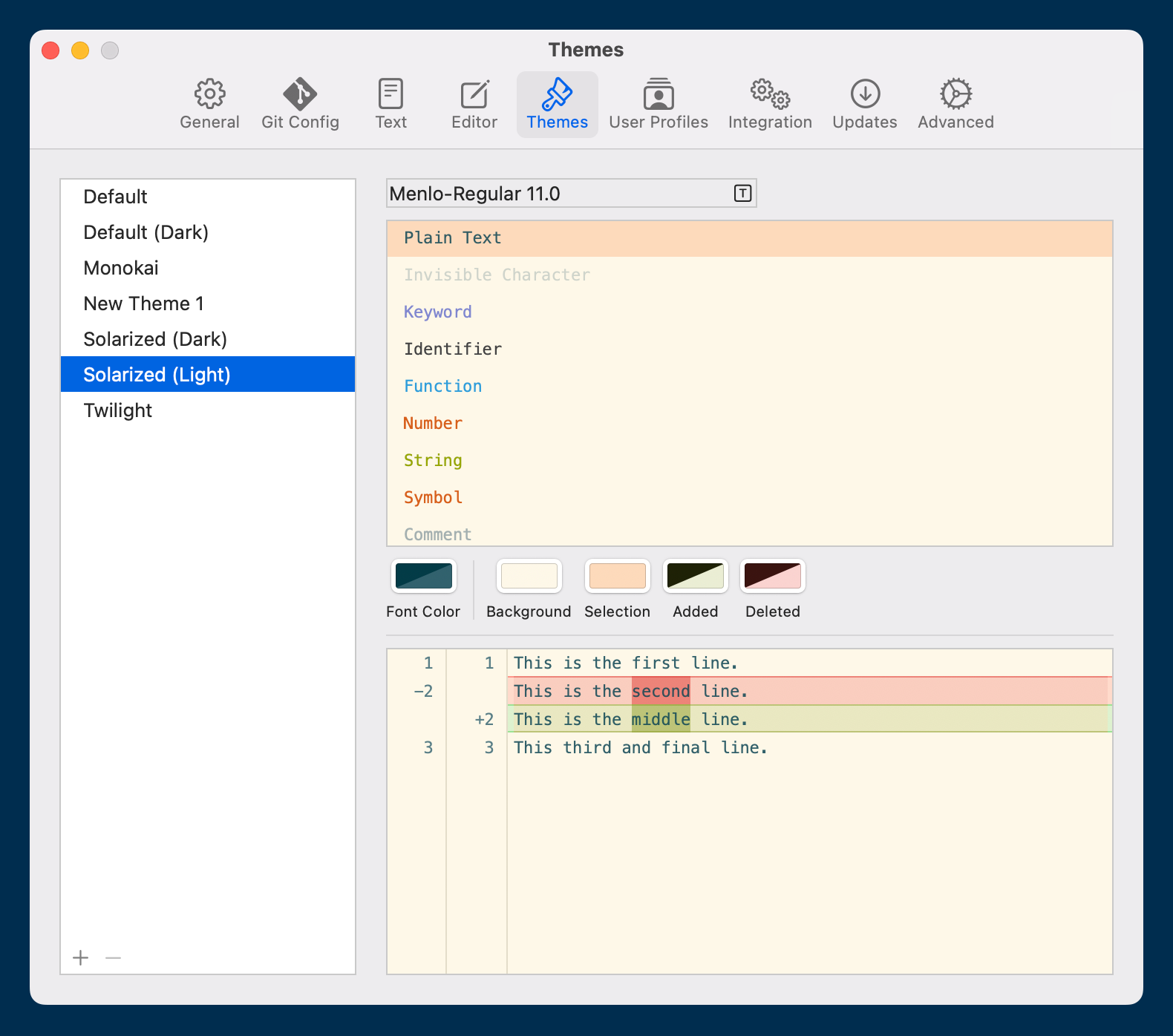
    The "Themes" dialog in the Settings now presents more customization options. We've updated every pre-existing theme to support the Syntax Coloring feature, but you can also adjust them to your liking or create your own!

10.5

New

  • GitMoji: Tower now supports GitMoji in writing and viewing commit messages.

  • Ref name: Add setting in general to automatically convert ref names into valid format while typing

Improved

  • Working Copy: Pasting multi-line text into the commit subject will now paste the first line into the subject and the rest into the commit body.

  • Merge tool: Not showing anymore an error message if the merge tool was closed without fixing the conflicts.

Fixed

  • Working Copy: Typing an emoji into the commit subject field altered the font in some cases. This has been fixed.

  • Branches Review: The commit list for a branch was not reloaded when a new commit was added to a branch. This is working as expected now.

  • Ref name: Allow users to input single character "@"

10.4

New

  • Refs: Ref names are now automatically converted into a valid ref format while typing.

  • Team Invites: If you are able to invite team members, you will be notified in the sidebar now.

Improved

  • Device Activations: The list of activated devices is now scrollable instead of taking up a lot of vertical space.

Fixed

  • Diffs: Diffs containing certain newline characters were rendered incorrectly. This has been fixed.

  • Team Invites: The "Send" button did not enable when confirming an entered email address by pressing the "Tab" key.

10.3

New

  • Environment settings: In addition to adding custom environment variables, environment variables from the login shell are now also automatically added when running Git commands. This should make hook scripts work without additional configuration.

Improved

  • Branches: Deleting a branch with unmerged changes will now trigger the “Delete Anyway?” confirmation dialog again that is supposed to appear if the “Force Delete” option was not set.

  • Diffs: If a diff is hidden behind a “Large Diff Warning”, syntax coloring will only be triggered if the user decides to actually show the diff.

  • Syntax highlighting: Improved memory management

  • Merge tool: Show error dialogue when merge tool fails to open

  • About panel: We gave the About panel a new, modern look. The version string is now selectable, too!

  • Settings: We have moved the Appearance selection into its own “Appearance” tab to free up space in the “General” tab.

Fixed

  • Syntax highlighting: Showing diffs for deleted files could fail or crash in some cases. This has been fixed.

  • Syntax highlighting: Deleted files are now highlighted properly.

  • Terminal integration: “Open in Terminal” now works if there is no visible Terminal window open.

  • Environment variables: Removed values from environment are now being deleted

  • Environment variables: "GIT_EDITOR" and "GIT_SEQUENCE_EDITOR" are now ignored if they are set by the user

  • Tower CLI: Opening Tower with a path from the command line would not open the repository, only the Bookmarks view.

  • History: Showing the “no selection” view when no commit was selected was broken.

  • Commit Composing: The commit message draft was not properly saved/restored in certain cases.

  • Git remote URLs: HTTP URLs containing an unencoded @ character in the username part of the URL could not be read on macOS 14 Sonoma.

10.2.2

Fixed

  • App startup: In certain scenarios, “Getting Started” was not completed correctly for new users and it prevented the app from opening any new windows.

10.2.1

Fixed

  • Application Launch: A crash could occur during application launch if the custom environment file was in an invalid format.

  • Getting Started: A crash could occur during the Git configuration step in some cases.

  • Sync Dialog: The state of the “Use rebase instead of merge” option is now persisted.

10.2

New

  • Sync Action: This action synchronizes your HEAD branch with a remote branch by pulling and then pushing commits (if pulling was successful). If you are not using the default toolbar item set, you can add the Sync action to your toolbar by running “Customize Toolbar” from the “View“ main menu.

  • Settings: You can now configure custom environment variables used when running Git commands by visiting the new “Environment” tab in Tower's settings.

  • Settings: You can now choose 1Password as an SSH Agent for SSH Signing in the “Git Config” tab.

  • Settings: A new option under the “Integration” tab allows you to choose 1Password as SSH Agent used for remote connections and signing.

  • New Onboarding: This release includes new and improved Welcome & Getting Started workflows.

  • New License View: An improved license window will show more license information and allows you to deactivate devices.

  • Invite your Team Members: If you are on the Tower Pro plan, you can now invite team members directly from Tower! The view is available in the new Account window, accessible from “Tower” -> “License…”.

  • Refer a Friend: If you are on a single user license, you can start referring friends from within the app and both of you will receive a discount. The view is available in the new Account window, accessible from “Tower” -> “License…”.

Improved

  • Commit Info: "Signing Key" and "Signing Status" have been added for commits signed with SSH keys.

Fixed

  • Araxis Merge: Fixed an issue with the order of files being swapped when comparing them.

  • Syntax Highlighting: Text is now highlighted correctly when selecting lines for staging.

  • Syntax Highlighting: Colors rendered in syntax coloring are no longer darker than the ones in Settings.

  • Syntax Highlighting: Expanding a diff with syntax coloring enabled sometimes broke the view. This has been fixed.

  • GPG Config: Tower now recognizes GPG config when it is installed while the app is running.

  • SSH Signing: Tower now supports relative paths for allowed signers files.

  • Bitbucket accounts: We fixed a crash that occurred when creating or updating Pull Requests.

  • Themes: Renaming a theme no longer resets the colors to default.

10.1.1

  • Update build number to 365

  • SSH Keys: Tower could crash on startup when using certain types of SSH keys. This has been fixed.

  • Merge Tools: The integration now works as expected with newer versions of Araxis Merge.

10.1

Improved

  • Syntax Coloring: We added support for more languages. If the language of a file cannot be determined by its file extension, it will now be attempted to auto-detect the language.

  • Themes: The color schemes for the default light and dark theme have been adjusted to improve contrast for added/deleted lines.

Fixed

  • Diff Views: Viewing diffs with syntax coloring enabled could potentially cause a crash.

  • Changesets: In certain scenarios, patches from changesets in the History or Stashes view could not be applied to the Working Copy.

  • Memory Management: Resolved an issue where certain view components could cause cause a memory leak.

10.0

New

  • What's New: Tower will now display a "What's New" window on start for updates that introduce new features or important improvements.

  • Syntax Coloring: you can now enable syntax coloring for diff views and raw diff views! Head over to "Text" — our new Settings dialog — to add syntax highlighting to your diffs.

  • "Text": this new Settings dialog also allows you to configure your preferred tab width and enable/disable showing invisible characters in diff views and raw views.

  • Syntax Coloring support in Themes: navigate to "Settings" → "Themes" to customize the way syntax coloring is presented. Select one of the existing themes, modify them, or come up with your own!

Fixed

  • Commit Signing: The option to enable commit signing is now always available, even if no GPG binary is installed. Signing via SSH could not be enabled in this case.