Tower 6
With version 6, we are bringing Tower to the new macOS Big Sur and the Apple Silicon architecture.
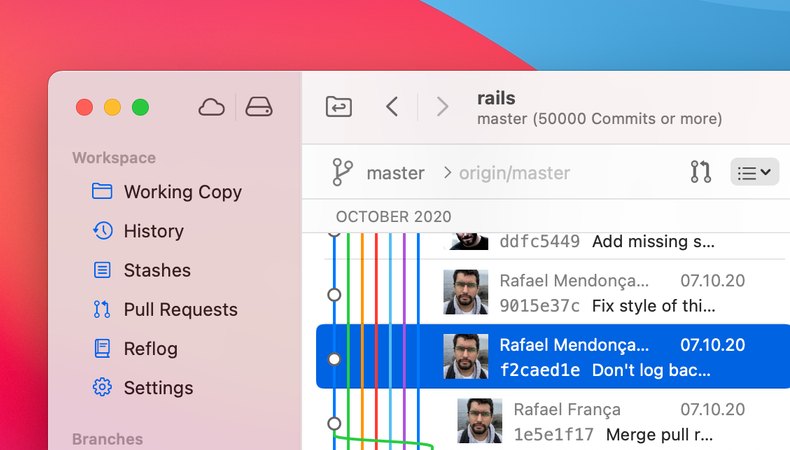
From new and redesigned icons all the way to a full-height sidebar and a streamlined toolbar, Tower’s new design feels right at home on Big Sur.
In addition, Tower is now compiled and optimized for the new Apple Silicon architecture, resulting in better performance and battery life.
Remote Operations: The “Push” option has been enabled for branches where no remote equivalent exists. Selecting this option will show the “Publish Repository” dialog.
Services View: We have improved the icons for the repository and SSH key views.
UI: We improved the appearance of the text fields when using light mode on macOS Big Sur. In addition, these fields no longer appear disabled on prior OS versions.
Toolbar: The new toolbar icons now appear correctly on macOS 10.13.
Force Push: Many of you requested an easier way to force push, so we added a dedicated force push toolbar button to make this possible. The button can be added by customizing the toolbar.
Create New Branch: We also added a dedicated toolbar button to create a new branch. The button can be added by customizing the toolbar.
Preferences: Action bars used in preference panes now all have the same appearance.
UI: We improved the appearance of the Quick Actions and Quick Open dialogs, as well as the repository icons.
UI: The text input fields in the commit composing area now have a darker background in Light appearance to improve contrast.
Bundled Git: We updated the bundled Git version to 2.30.2.
Working Copy: A regression caused the filename column not being shown correctly.
History View: Commit details are now being refreshed correctly after a tag has been added.
Preferences: The view height of the Git preferences pane is now correctly sized.
UI: Autocomplete windows are now displayed without extra spacing.
Crashes: We fixed a crash which prevented some users from being able to launch Tower.
Merge and Rebase: In some cases, when performing a merge or rebase which resulted in a conflict, the conflicted files were not correctly displayed (the files could be revealed by scrolling). This has now been fixed.
Sidebar: We fixed an additional case where the width of the sidebar was not remembered after reopening a repository.
Sidebar: The icons in the repository sidebar are now correctly aligned.
Crashes: We fixed a number of smaller / less common crashes in different situations.
Working Copy: The working tree is now refreshed after a commit if a commit hook failed.
Working Copy: After merging or rebasing, entries could appear under the commit area view and had to be scrolled down. The scrolling position is now updated correctly.
History: When switching between ref histories the scrolling position was not reset to the top.
View Restoration: After re-opening the app, the width of some views was not correctly restored in certain cases.
Edit Commit Message: It is now possible to select the Amend option when editing a commit message. When this option is selected, the author of the commit will not be changed.
LFS Image Diffing: You can now view the diff for LFS image files. We also included a clickable badge which shows the LFS pointer information.
Toolbar: Tower now uses the short labels again for the “Toolbar” and “Terminal” buttons, resulting in a more even spacing for toolbar items.
Rebase Backend: Since version 2.26, Git changed the default rebase backend from apply to merge. We have made sure that Tower handles the new backend correctly.
Our bundled Git has been updated and is compiled as universal binary supporting Apple Silicon hardware.
The TowerCLI crashed on hardware using Apple Silicon. This has been fixed.
We fixed an issue where using multiple Bitbucket service accounts with Git HTTPS connections could fail.
Working Copy: In some cases, navigating the sidebar with the arrow keys caused changed files to disappear in the Working Copy. This has been fixed.
GPG: We fixed the incorrect label that was displayed when no GPG binary was selected in Tower’s Preferences.
History View: The tab bar was showing "Counting Commits" whenever the window title was hidden.
Bookmarks: It is now possible to filter repositories correctly in the bookmarks view.
Sidebar: Tower again remembers the width of the sidebar after the repository is re-opened.
Working Copy: Animations are now working correctly again when selecting files to stage & unstage.
Working Copy: After resolving a merge conflict, the background color of the conflicted file now changes back to normal.
Toolbar: The toolbar was displayed incorrectly for users on macOS 10.13 and below.
Submodules: Editing a submodule URL resulted in wrong changes. This is now working as expected.
Rebase: In certain cases, continuing a rebase step after resolving all conflicts failed. This has been fixed.
Repository Bookmarks: Icons next to bookmarks and bookmark groups are now displayed correctly. This issue affected users on macOS 10.15 and below.
Working Copy: The working copy diff view now behaves as expected when using a mouse with a scroll wheel.
Designed for macOS Big Sur: We made lots of large and small improvements to make Tower feel at home on the new macOS Big Sur. Read on to learn more...
Icons: In the toolbar, the sidebar, and other areas in the app, we’re introducing new, redesigned icons.
App Icon: Take a look at your Dock and you’ll see that the Tower app icon now fits right in with other app icons on Big Sur.
Full-Height Sidebar: In macOS 11, sidebars in apps now typically take the full window height. We’ve made this possible in Tower, too.
Navigation Bar: With the new style in Big Sur in mind, we decided to remove the “Navigation Bar” (below the toolbar). This results in a much cleaner, much clearer UI.
Submodule Navigation: When navigating into a submodule you’ll see that a new toolbar icon appears; this allows you to jump back to the parent repository.
View Subheadlines: Some detail views now show their own subheadlines, giving you a quicker overview of the situation.
Services & Bookmarks: These icons, previously located in the Navigation Bar, are now also located in the main toolbar.
Rounded Selections: List views (like the Commit History) and the sidebar now feature the new rounded selection style in Big Sur.
Apple Silicon Architecture: Tower is now compiled with support for the new Apple Silicon architecture. Additionally, we improved the way background tasks are handled in order to get the best performance and battery life from the new Apple Silicon architecture.
GitHub Service Accounts: We removed support for Basic Authentication as this is deprecated by GitHub. We also updated OAuth authorization to use our own web flow instead of the one provided by GitHub for native apps, which is deprecated as well.