8.3
Fixed
Dragging files from Working Copy to other apps stopped working.
Closing the last open window could sometimes crash the app.
Loading available hook scripts for a repository could sometimes crash the app.
New features, improvements, and fixes. Here are the latest Tower updates!
Version 8 is all about easier branch management. Say hello to a whole new set of tools to review, pin, compare, and filter branches!
The highlights are presented below, but you can also watch this 3-minute video for more information about each new feature:
You can now compare a branch against a different local branch to quickly review all the changes that were introduced.
If merging will lead to merge conflicts, a warning sign will be displayed, which you can click to access the conflicting files' file paths.
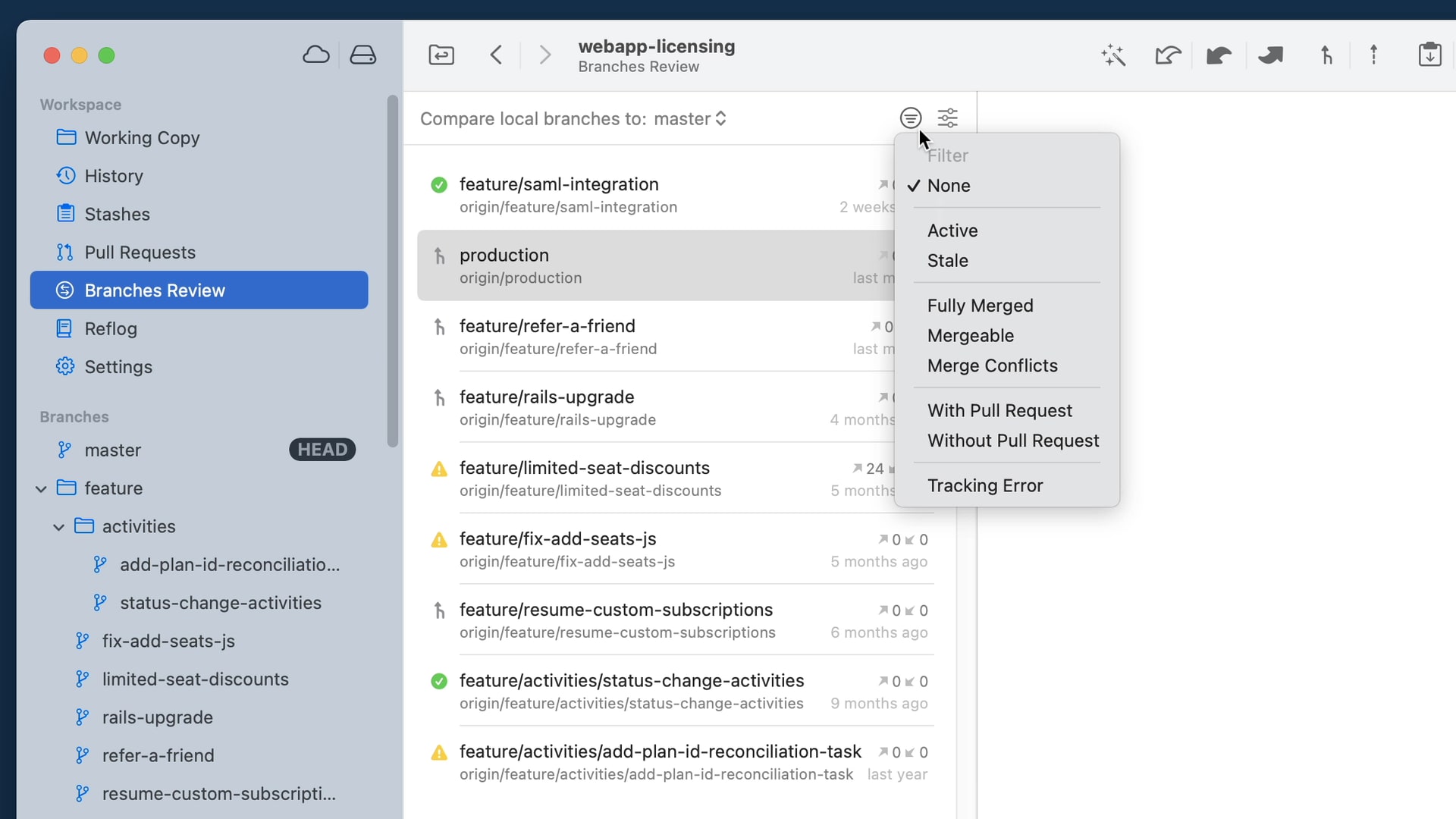
A new view in the Workspace with several filtering options that allows to quickly pinpoint which branches have been stale/obsolete or can be safely deleted.
You can now pin any branch so that it is always there when you need it. Pinned branches will appear in a new "Pinned" section in the sidebar.
Use the input field at the bottom of the sidebar to quickly filter branches, tags, and submodules as you type.
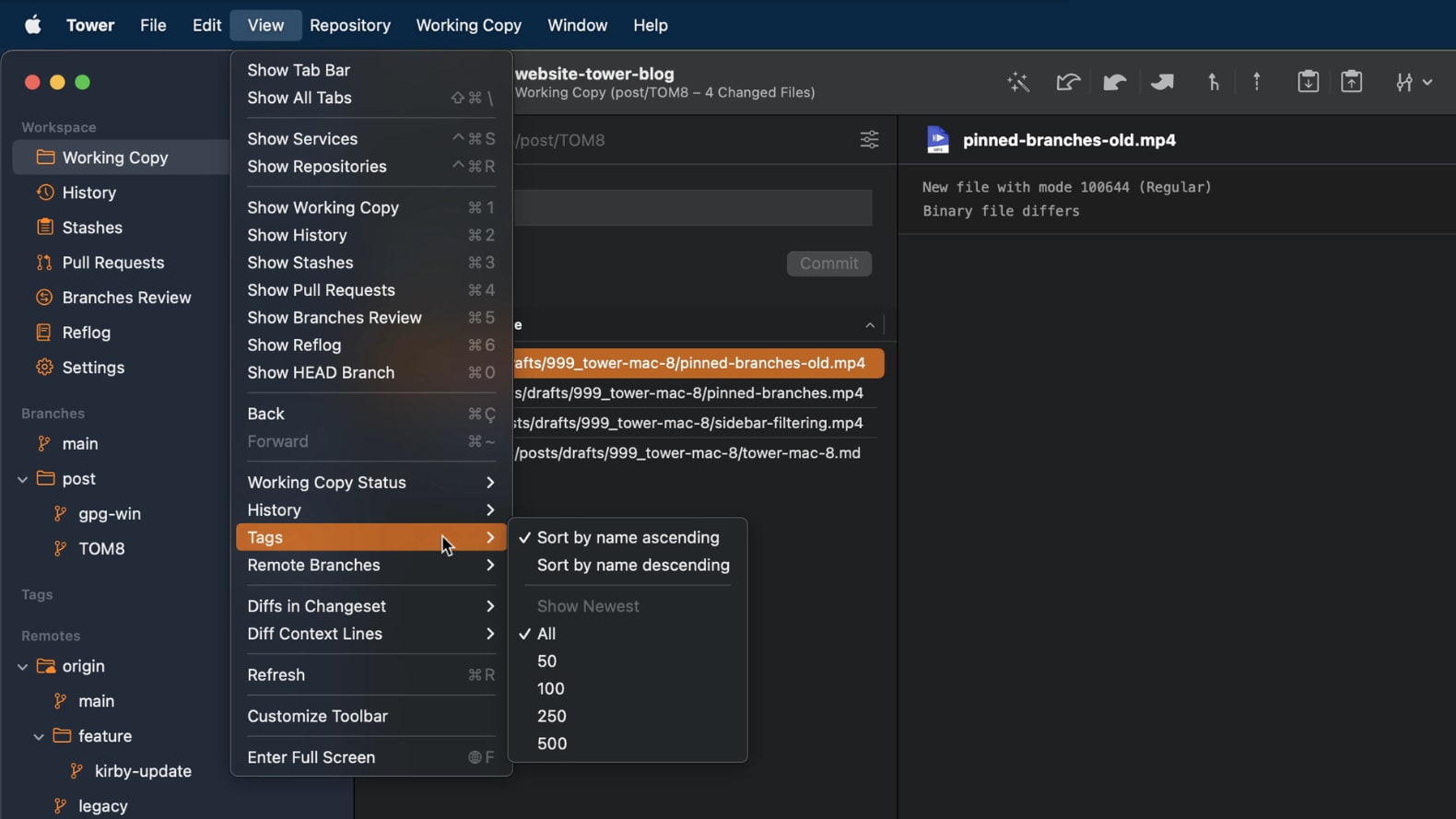
In the "View" menu, you now have the option to see only the newest 50/100/250/500 tags or remote branches.
Dragging files from Working Copy to other apps stopped working.
Closing the last open window could sometimes crash the app.
Loading available hook scripts for a repository could sometimes crash the app.
Skip Hooks: It is now possible to skip the execution of hooks for commit push, pull, merge, rebase and apply.
Sidebar: An option to show the number of stashes in the sidebar has been added to the General preference pane.
Pull Requests: Branches and Remote Branches can now be dragged on the Pull Requests workspace item to create a new pull request. Furthermore, the Ctrl + Cmd + P keyboard shortcut for creating pull requests is now available in all repository views.
DiffTool: The diff tool can now be opened with the current working copy status.
Performance: We’ve improved the loading speed for repositories with many tags.
Auto-Fetch: Fetch operations are now automatically aborted if no data is received for some time, resolving an issue where Fetch operations block other remote operations until manually cancelled.
Pull Requests: The commit and changeset views have been improved. It is now possible to see the diffs for the changeset items of individual commits.
Pull Requests: The context menu in the sidebar now has an entry to show a pull request if one exists for the selected branch.
Git Flow: The default branch is now "main" instead of "master".
History: A keyboard shortcut to toggle the "Compare Branch" feature has been added (Ctrl + Opt + Cmd + C).
Branches Review: GPG signature status is now available for commits.
Services: GitHub repositories are now created with Issues enabled by default.
Git LFS: the version was updated to 3.1.2 and the binary is now universal to support Macs with Apple Silicon chips.
Sidebar: Branches could be dragged to workspace items, creating a detached HEAD. This has been fixed.
Sidebar: The tag section is not automatically expanded anymore.
History: The "Autosquash" button is now disabled if the working copy is updating.
Remotes: Pulling with Git versions >= 2.35 could lead to an error in Tower. This has been fixed.
Remotes: Updating remotes crashed if multiple values existed for the same key in a remote config section. This has been fixed.
Diff Tools: When comparing two branches or tags, the full ref names are now passed to the Diff Tool to resolve any ambiguity errors.
Several crashes have been fixed.
Repository Sidebar: You can now drag'n drop branches on ref groups to rename them.
Repository Sidebar: Tags are now sorted by semantic versioning rules.
Repository Sidebar: We've ensured that groups are expanded after creating a new grouped branch or tag.
Branches Review: Context menus for commits and changeset views have been added.
Branches Review: Information about the merge status and tracking errors are now shown in more detail in the summary header view.
Branches Review: Added “DiffTool” as row action to the detail views.
Branches Review: A diff stats summary row is now shown in the detail views.
Branches Review: All diffs in the “Changeset” detail view can now be expanded.
Merge Conflicts: You can now copy file paths in the merge conflicts popover using the context menu.
Pull Requests: Pull Requests are now updated in intervals in the background.
Tag Filtering: Added lower number options for filtering tags.
Branches Review: Filter icon is not colored if filter is active on first start.
Branches Review: Deleting one or more branches through the list view can now be undone properly.
Branch Tracking: You can now remove the tracking configuration for branches where the tracking brach is missing.
Repository Sidebar: Ref Groups are not collapsed properly after clearing the sidebar filter.
Repository Sidebar: Fixed branch renaming when dragging a branch onto the "Pinned" section.
Compare Branches: In a branch's history, toggle the “Compare” icon to compare the branch against a base branch and show only the commits that have been made on the local branch. This is especially helpful for reviewing all changes introduced by a branch. Also, the number of merge conflicts is now being displayed. Also, a popover will reveal the conflicting file paths on click.
Branches Review: Accessible from the “Workspace“ section in the sidebar, quickly review your local branches to identify stale branches and view their merge status by comparing them to a base branch. This helps you to clean up obsolete branches that have been fully merged and can be safely deleted.
Sidebar Filtering: You can now filter branches, tags and submodules using the input field at the bottom of the sidebar.
Filter Tags and Remote Branches: You can now limit the number of visible tag and remote branch items in the sidebar to the last created/updated ones using the ”View” menu and then “Tags” and “Remote Branches”, respectively. All tags and remote branches remain accessible from e.g. Quick Actions and selection controls.
Branch Pinning: Pin branches to a new “Pinned” section in the sidebar. This way your most important branches are always there when you need them.
History: If there is a related Pull Request for the currently selected branch, it will indicate this by displaying the Pull Request number in the header.
Tags Loading: Initially loading many tags is now much faster and does not prevent other operations from running.
Working Copy: In some cases the “Compose Commit” view did not automatically collapse after committing. This has been fixed.
Commit Composing: Settings for spelling checks will now persist again for commit subject and body fields.
File History: Resolved a drawing issue on macOS 12+ where the graph line was not continuously drawn.
Repository sidebar: In some cases, the Repository sidebar could lose its selection and did not display any detail view. It is now ensured that the sidebar always has an item selected.
Tags: Updating tags could cause a crash if the repository had been deleted outside of Tower.