Release Notes

New features, improvements, and fixes. Here are the latest Tower updates!

Tower 9

Our latest update brings a completely redesigned merge experience, starting with our brand-new Merge UI! We also implemented some of the most requested features from our community, such as diffing improvements.

Watch this 4-minute video to learn everything that is new in Tower 9 for Mac!

What's New in Tower 9

  1. A Brand-New Merge UI

    A Brand-New Merge UI

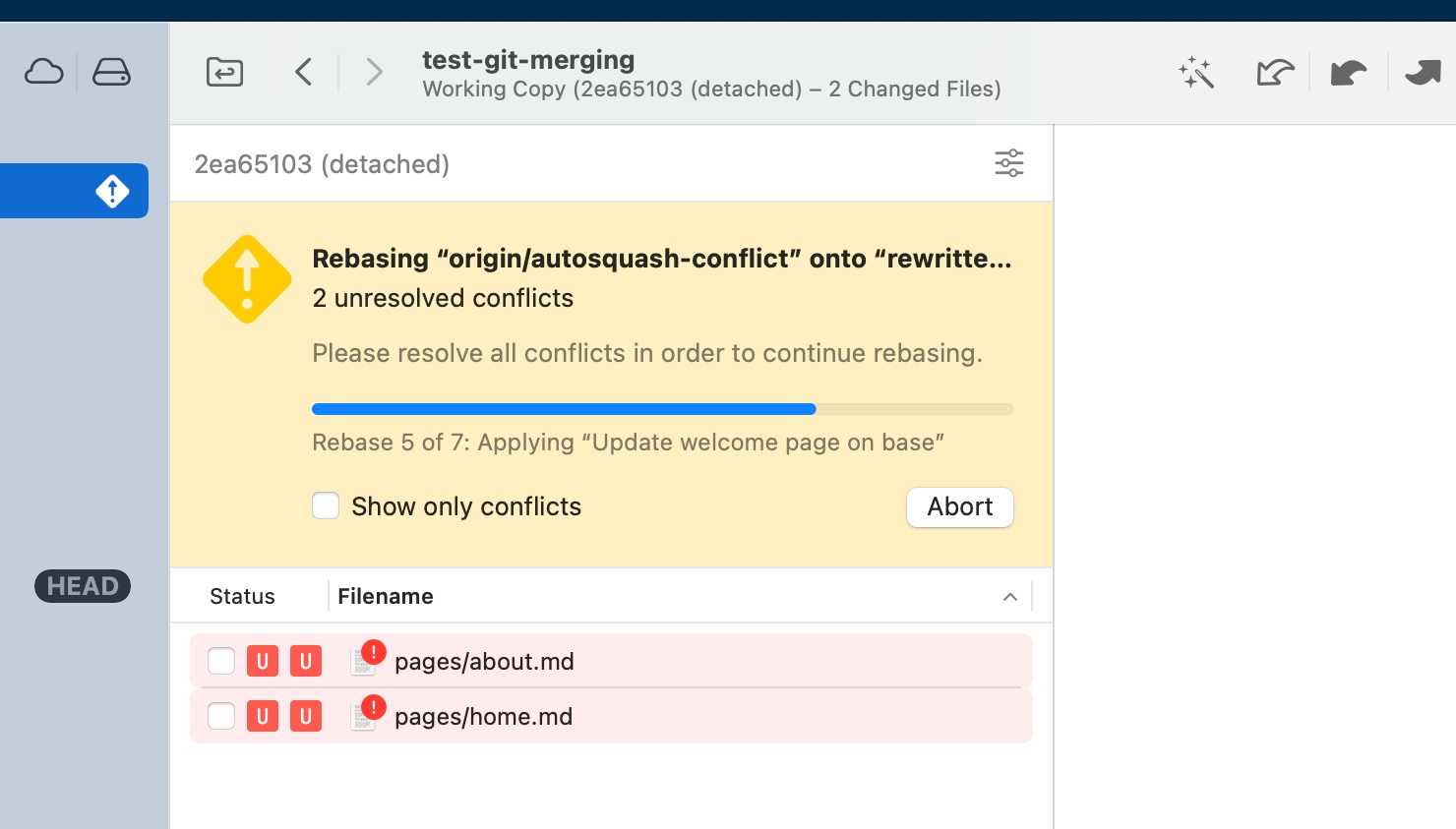
    Our new Merge UI will come in handy when you need to understand the status of merge conflicts. It will show you the number of conflicts left to resolve and the corresponding files. In case of a rebase, you will also know which step you're currently in.

  2. Instant Conflict Detection

    Instant Conflict Detection

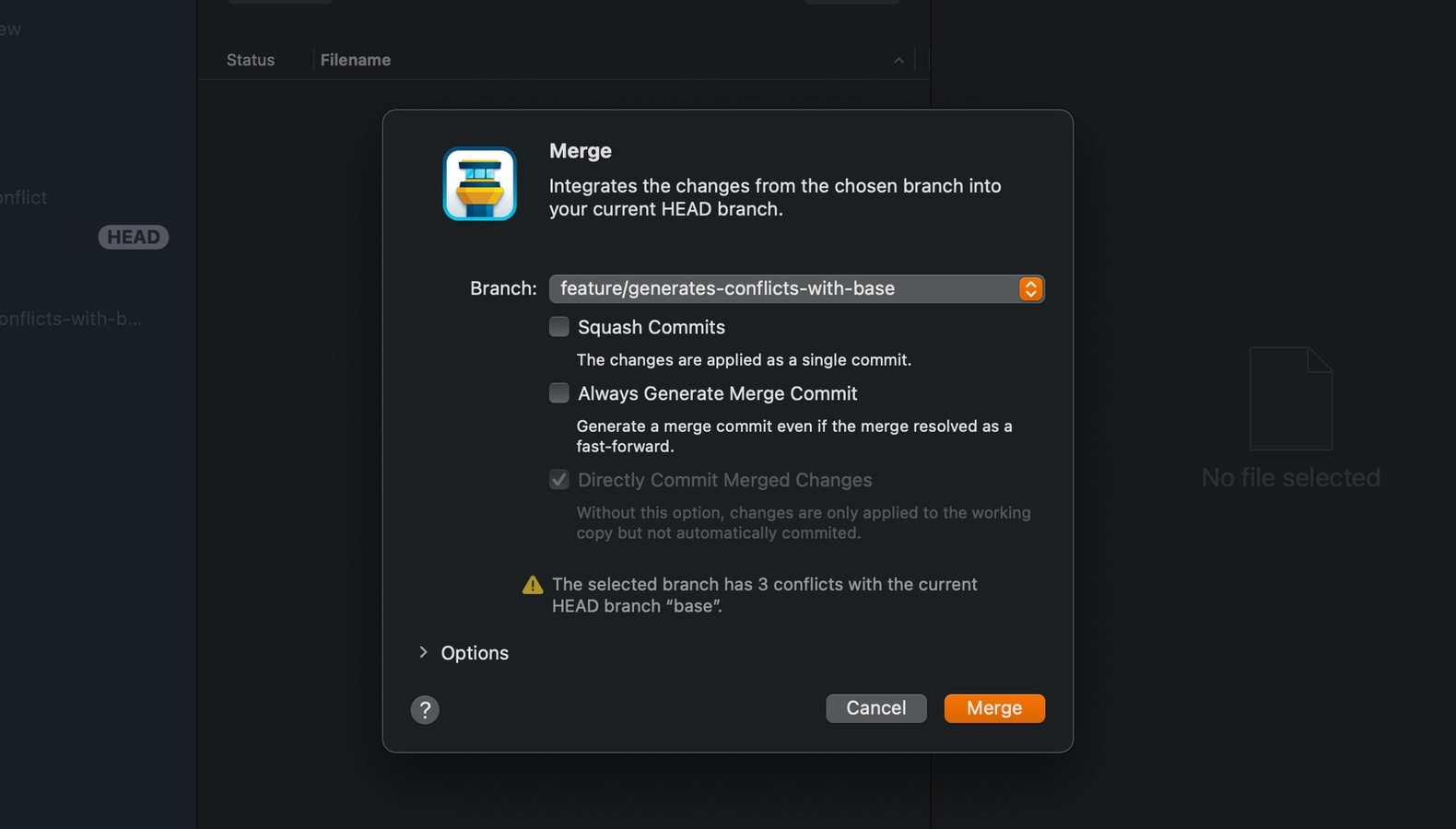
    When merging another branch or revision (by merging, rebasing, or pulling), the dialog will instantly let you know if conflicts will occur.

  3. Snapshots

    Snapshots

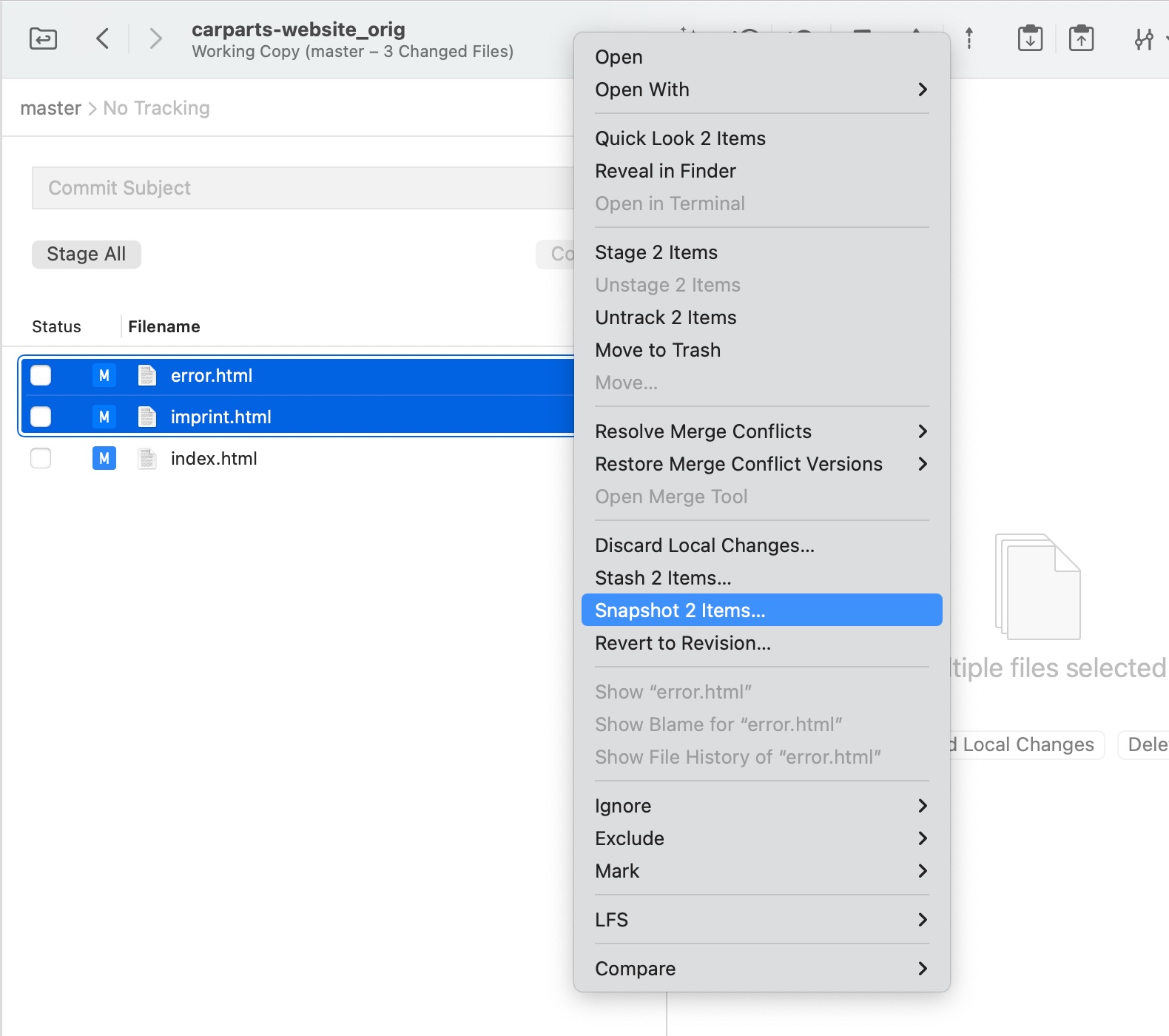
    Snapshots are essentially stashes that are automatically re-applied to the working copy — which can be useful to quickly try out ideas.

    You can create snapshots of your entire working copy or capture just a number of modified files. Your work can be retrieved later by accessing the “Stashes” view.

  4. Auto-Expand Diffs in Changesets

    Tower can now automatically expand diffs in changesets.

  5. Large Diff Warnings

    Large Diff Warnings

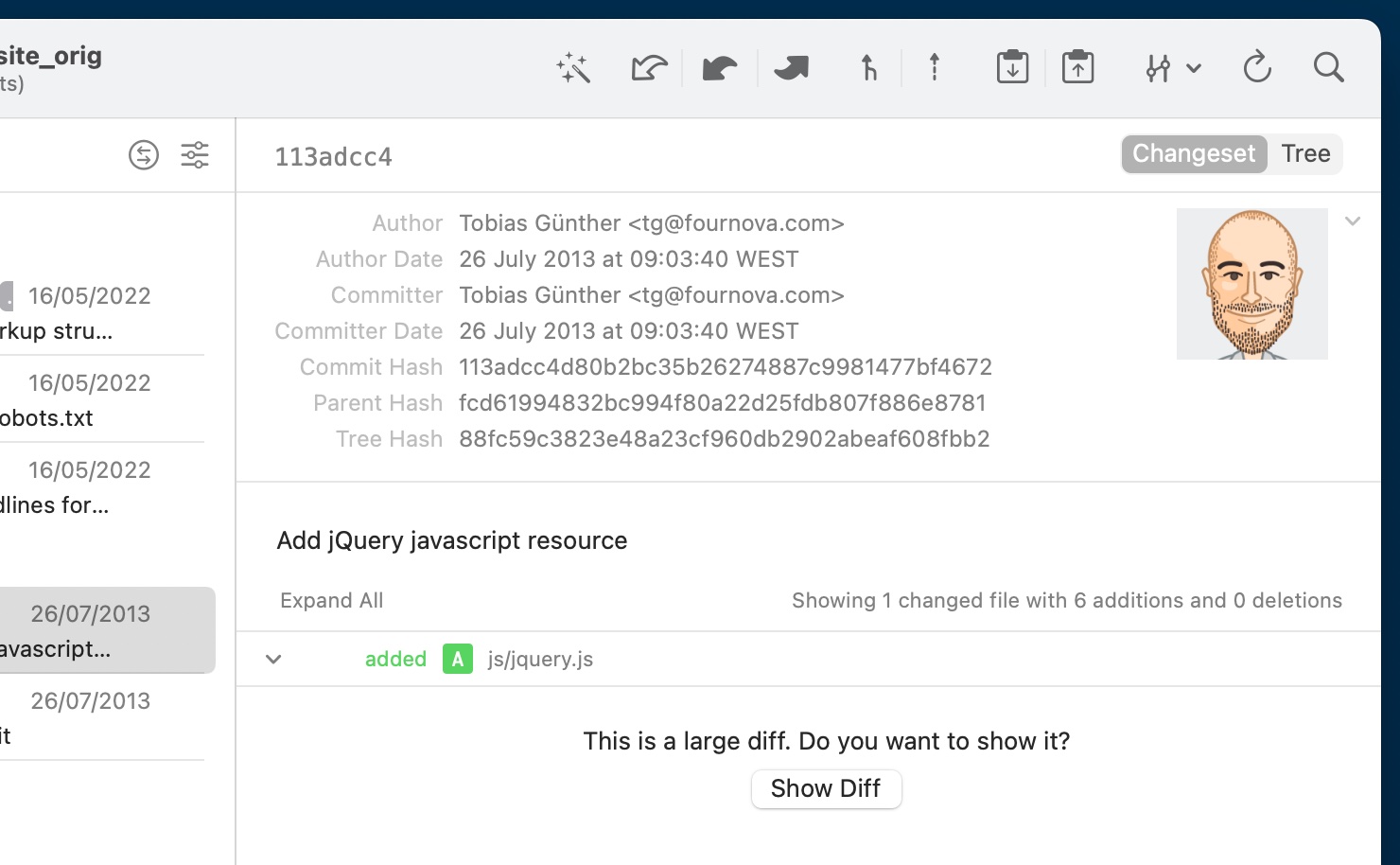
    You will now see a "Show Large Diff" prompt before Tower attempts to display it. You can adjust the threshold in the "Preferences" window.

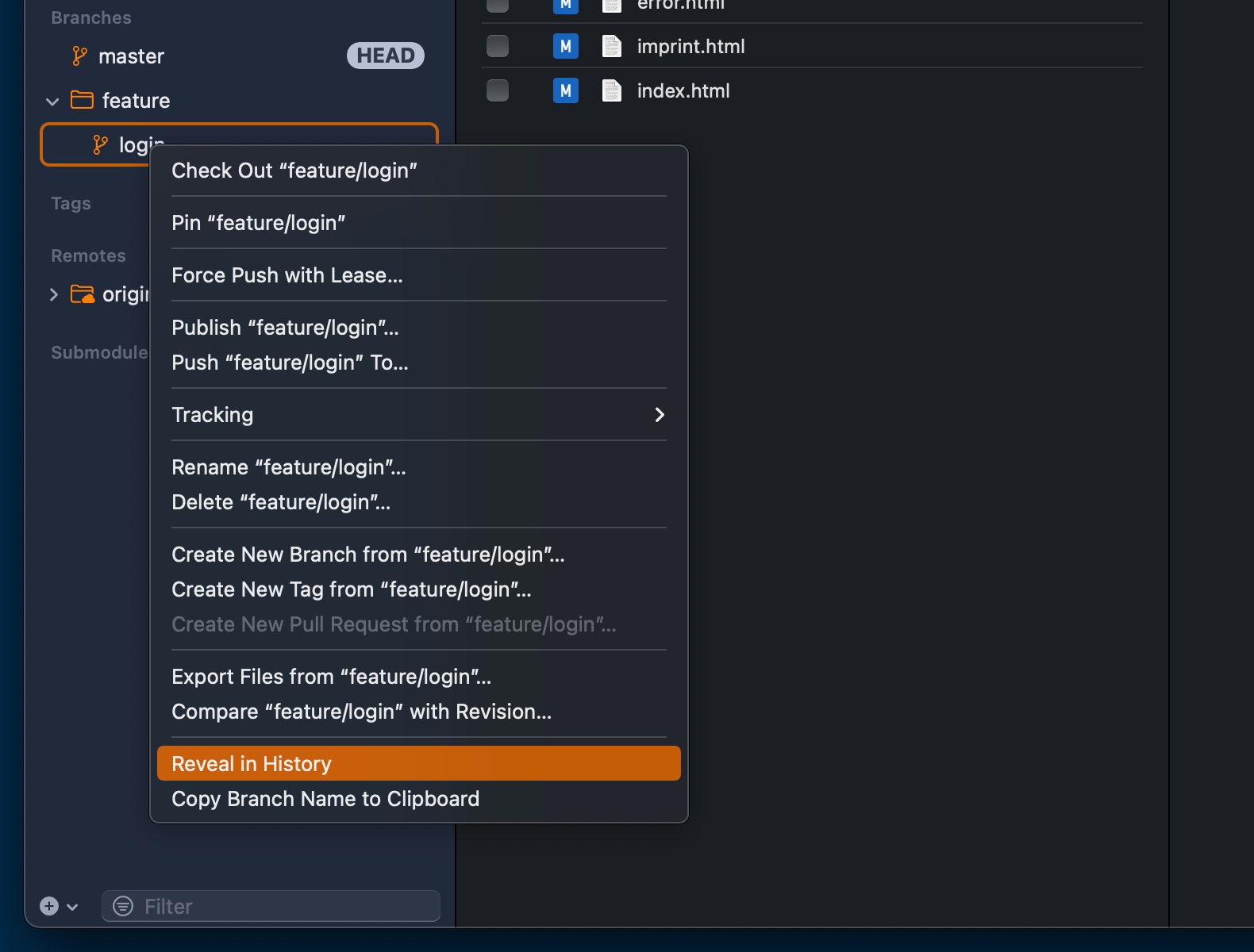
  6. Reveal in History

    Reveal in History

    You can now locate any commit, branch, or tag in Tower's History view.

9.4

New

  • SSH Signing: You can now sign commits and tags using your SSH key, see which commits have been signed and by who, and connect SSH keys with your User Profiles - all right from within Tower.

Improved

  • Signing verification: The signature popover now contains a help button that will open our online help about signing verification.

  • Commit Composing: The autocomplete window is now a bit wider to improve readability of longer texts. In addition, truncated labels now have a tooltip that is shown on hover.

Fixed

  • Commit Message Editing: The hard line wrapping guide is now shown in the “Edit Commit Message” dialog.

  • Commit Message Editing: The “Reformat Paragraph” function now also works in the “Edit Commit Message” dialog.

  • Commit Message Editing: The commit subject character count label is not hidden beneath the scrollbar if a mouse is connected anymore.

  • Stashes: The stashes list could become empty if the changeset was filtered in some cases. This has been fixed.

  • Reflog: The reflog list could become empty if the changeset was filtered in some cases. This has been fixed.

  • Preferences: The “Sign Commits” option would become unusable if the GPG binary was uninstalled, making it impossible to turn signing off. This has been fixed.

  • Preferences: The “Key does not match committer email” warning icon did not disappear after creating a matching key. This has been fixed.

  • Preferences: Tower does not crash anymore if a user profile with an empty name is present. Furthermore user profiles cannot be saved if the title, username or email are empty .

  • Repository Sidebar: Tower would show incorrect tooltips in some cases. This has been fixed.

  • History: Gravatar images are now displayed correctly again.

9.3

New

  • Merge Wizard: The Merge Wizard now shows all commits that actually changed the file on each side, instead of just showing the - often unrelated - commit at the tip of the branch or revision for a conflict side. This provides helpful context information about the conflict and shows who modified the file on each side and when.

  • Merge Wizard: The last modified timestamp is now displayed for each side, making it easy to determine which version is newer.

  • Quick Actions: You can now execute the “Fast-Forward” command on a non-HEAD branch that has changes.

Improved

  • Merge Wizard: Each conflict side is now labeled with the branch name or revision that the version originated from, making it easier to understand which side belongs to which branch or revision.

  • Merge Wizard: Branches are also more accurately displayed, identical to the Merge Status view.

  • Merge Wizard: All merge cases are now properly displayed, including merging arbitrary commits or merging into a detached HEAD.

  • Merge Wizard: A loading view is now displayed if loading the merge conflict takes longer than a certain threshold.

  • Diff Tool: The --no-symlinks option is now passed to diff tools by default.

Fixed

  • Branches: Renaming a pinned branch within Tower will now preserve its “pinned” status.

  • Working Copy: Creating a snapshot that includes untracked files now works as expected.

  • Working Copy: A crash that occurred when searching for files using tree view has been fixed.

  • Diff View: The diff view would incorrectly display “Diff contains only whitespace changes” while loading a large diff. This has been replaced by a loading indicator.

  • Stashes: If the list of stashes was filtered by a search, dragging a stash to the working copy to apply it would apply an incorrect stash. This has been fixed.

  • Branches Review: The compare branch context menu action now opens the compare dialog with a pre-filled text field.

  • History: After turning off GPG verification, the ref badges would be shown on an old commit as well as on a new one after creating it. This has been fixed.

9.2

New

  • Preferences: You can now customize the app appearance to always dark, always light or match the system.

Fixed

  • Diff View: Inline highlighting is now drawn correctly if a diff contains Windows line endings.

  • Pull Requests: GitLab Pull Requests refresh properly instead of showing a “Data not available” warning.

  • Working Copy and Branches Review: On macOS 13, the width of the middle pane in the Working Copy and Branches Review sections always reset themselves to the default after leaving the view.

  • Commit Area: The commit area was not automatically expanded in all cases if the body contained input.

  • Avatars: In some views, the avatar images of users were not loaded initially.

  • Also updates the bundled Git binary to version 2.39.1.

9.1

New

  • Allow auto-stash for merges: You can now re-apply auto-stashes when merging revisions.

Improved

  • Merging: When an empty commit is about to be created during a merge, a dialog will now make users aware of this.

  • Merging: When creating empty commits in merge sequences, the original author information is now retained.

  • Merging: Merged branch names displayed in the merge status area are now more accurate again.

  • Diff Views: Line numbers for wrapped lines are now aligned to the top again.

Fixed

  • Diff Views: Resizing the window did not properly redraw line numbers in all cases.

  • Diff Views: Inline change highlighting and line numbers could get out of sync when quickly resizing the view.

  • Diff Views: Drag-selecting single lines could make diff content flicker or vanish.

  • Working Copy: Resizing the diff view could result in a crash.

  • Commit Area: When editing revisions, the “Commit” button was enabled even if there were no more staged changes.

  • Branches Review: On macOS 10.15, navigating to the “Branches Review” view could crash.

  • Autosquash: If a “fixup!” or “squash!” commit introduced conflicts, continuing the merge sequence didn't correctly fixup/squash the commit.

  • Working Copy: Some working copy actions could be started multiple times before they were disabled in the UI, resulting in crash.

  • Toolbar: Clicking “New Tab” button could leave the toolbar disabled until window deactivation and reactivation.

9.0

New

  • New Merge UI: We have redesigned the Merge UI to be more consistent across different merge modes and to be more explanatory about the current merge state and when editing revisions.

  • Filter conflicted files: During a merge conflict, a new option is now available to show only conflicted files.

  • Auto-expand changesets: A new view option has been added to configure behaviour of auto-expanding diffs in the History changeset views. You can find it under “Diffs in Changeset” in the “View” main menu.

  • Merge conflict detection: Dialogs which involve merging another branch or revision (e.g. merge, rebase, pull, …) will now show if merging will result in any conflicts or merge cleanly.

  • Show branch/commit in History: You can now reveal a branch, tag or any commit in the Tower's History view by selecting “Reveal in History” from the context menu.

  • Snapshots: Create snapshots of your working copy or individual changed files. Changes are safely stored in a stash but they remain in your working tree. This feature is available from the context menu of changed files or from the “Working Copy” main menu.

  • Merge Conflicts: You can now reset a merge conflict to its unmerged state, even after it has been resolved. This is available in “Restore Merge Conflict Versions” submenu from the context menu of a working tree entry.

Improved

  • Empty merge commits: When a merge commit becomes empty, you can now create an empty commit or skip the commit.

  • Rebase: You can now edit the merge message after resolving conflicts during a rebase.

  • Large diffs: Large diffs are not displayed automatically anymore. Instead, you will be prompted to display the diff. The threshold for displaying the warning can now be configured in the General preferences.

  • Merge Conflicts: Resolved merge conflicts now remain always visible in the working tree entry even when they have been resolved without introducing any changes.

  • Dialogs: Validation errors and status views (e.g. in the “Force Push” dialogue) are now using a unified appearance.

Fixed

  • Auto-Fetch: Further improved cancellation of hung auto-fetch operations which could block other remote operations.

  • Pull dialog: The Pull dialog grew in width based on the length of branch names.

  • Pull Requests: Tower could crash when reloading pull requests.

  • Working Copy: Files could not be dragged to external editors.

  • History: Dragging changeset entries to apply patches did not work if the changeset entry was not expanded before.

  • Working Copy: The search field used a case-sensitive search when filtering for files. This has been changed to be case-insensitive.

  • Cherry-Pick and Revert: An error dialog was shown if Cherry-Pick or Revert resulted in a merge conflict. Tower now shows the Working Copy instead.

  • Also includes a couple of minor fixes and stability improvements.