
Release Notes

New features, improvements, and fixes. Here are the latest Tower updates!

Tower 11

Tower 11 introduces support for Commit Templates, allowing you to easily manage and insert your own templates for writing better commit messages. Starting with this release, we will also offer an ARM version of Tower!

What's New in Tower 11

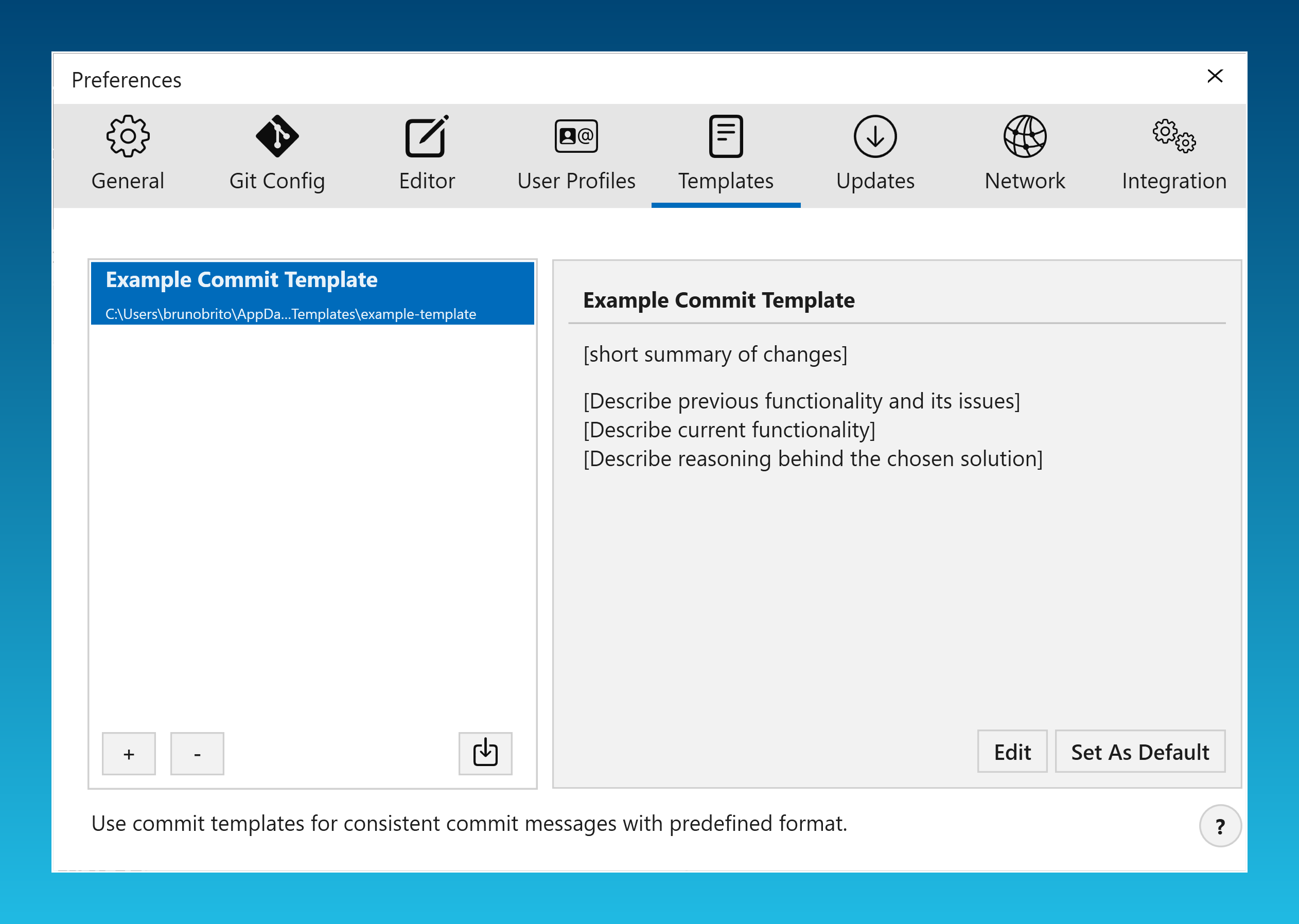
  1. Managing Commit Templates

    Managing Commit Templates

    To manage your templates, go to the new "Templates" tab in the Preferences.

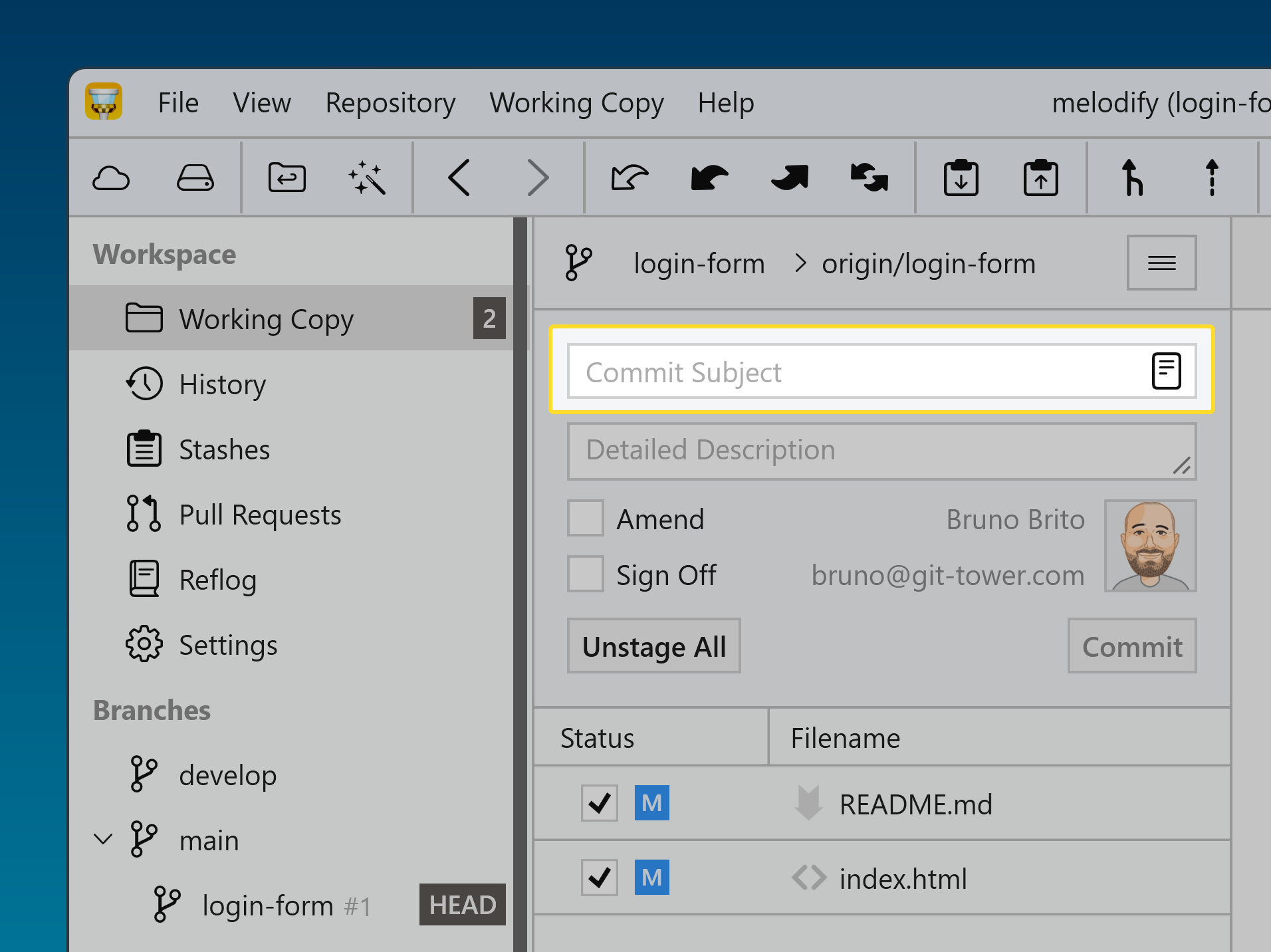
  2. Inserting Commit Templates

    Inserting Commit Templates

    When you're ready to create a commit, use the new "Commit template" button to access all your saved templates.

  3. Native ARM Version

    Native ARM Version

    If you have a Windows device equipped with an ARM processor, you can now benefit from a faster and more energy-efficient experience. This native ARM version guarantees that Tower operates at optimal performance on these devices.

11.2

Improved

  • Commit Composing: Auto-complete commands are now case-sensitive.

  • Working Tree: Improved refresh behavior so large diffs stay expanded while staging chunks or individual lines.

  • Submodules: Improved handling for repositories that do not report a HEAD branch.

  • Worktrees: Improved repository path handling when opening worktrees.

Fixed

  • Crash: Fixed a crash during Stage All operations in large repositories.

  • Crash: Fixed a crash during startup fetch operations.

  • Crash: Fixed a crash when refreshing Bitbucket Server pull requests.

  • Crash: Fixed a crash when checking out remote branches via sidebar double-click.

  • UI: Fixed vertically misaligned labels in segmented buttons.

  • Sidebar: Fixed keyboard navigation after indirect selection changes (for example via Quick Actions), so arrow-key navigation now continues from the currently selected sidebar item.

11.0

New

  • Commit Templates: You can now use commit templates when composing commit messages. Templates can be managed in the new Templates tab in Settings.

  • ARM64 Support: Added native support for the ARM64 architecture. The application will now automatically update to the version that matches your hardware.

  • Workflows: The Stacked Branches feature is now enabled by default and no longer needs to be selected manually as a workflow.

Improved

  • Branch Naming: Spaces in branch names are now automatically replaced with dashes for improved consistency.

  • Bookmarks: The default path when adding a new repository is now synchronized with the default clone path defined in Preferences.

  • Licensing: Evaluation of license expiration dates has been improved.

  • GPG Configuration: Improved GPG configuration handling by providing system environment variables for the GPG config binary.

  • Portable Git: Updated to version 2.52.0 for improved compatibility and performance.

  • Note that git-flow was removed in version 2.51.2. To maintain compatibility, do not remove previous versions of Embedded Git and select version 2.51.0 in Preferences → Git Config → Git Binary.

Fixed

  • Crash: Fixed a potential crash that could occur during application startup.

  • Preferences: Fixed a crash that could occur when switching the SSH implementation to OpenSSH.

  • GPG: Fixed an issue with retrieving the GPG binary version.

  • Commit: Fixed string encoding issues when committing changes.

  • Crash: Fixed a potential crash that could occur when opening or refreshing a repository.

  • Working Tree: Addressed a potential crash when refreshing the working tree.

  • Rebase: Fixed an issue where running an interactive rebase could result in intermittent errors.

  • Remote Branches: Fixed parsing issues with remote branch names.

  • Crash: Fixed a potential crash that could occur when deleting revisions.

  • Repository: Creating a new branch without specifying a parent branch now works as expected.