Release Notes

New features, improvements, and fixes. Here are the latest Tower updates!

Tower 13

Tower 13 for Windows is all about taking control of your branches! This release brings two features that work hand in hand: Branch Pinning to keep your most important branches front and center, and Automatic Branch Management to clear out the ones you no longer need.

You'll also find new "Fully Merged" and "Stale" badges in the sidebar, making it easy to spot branches that are ready to be cleaned up.

What's New in Tower 13

  1. Branch Pinning

    Right-click a branch to pin it. Pinned branches appear in a dedicated "Pinned" section at the top of the sidebar, so your most important branches are always within reach.

  2. New "Fully Merged" and "Stale" Badges

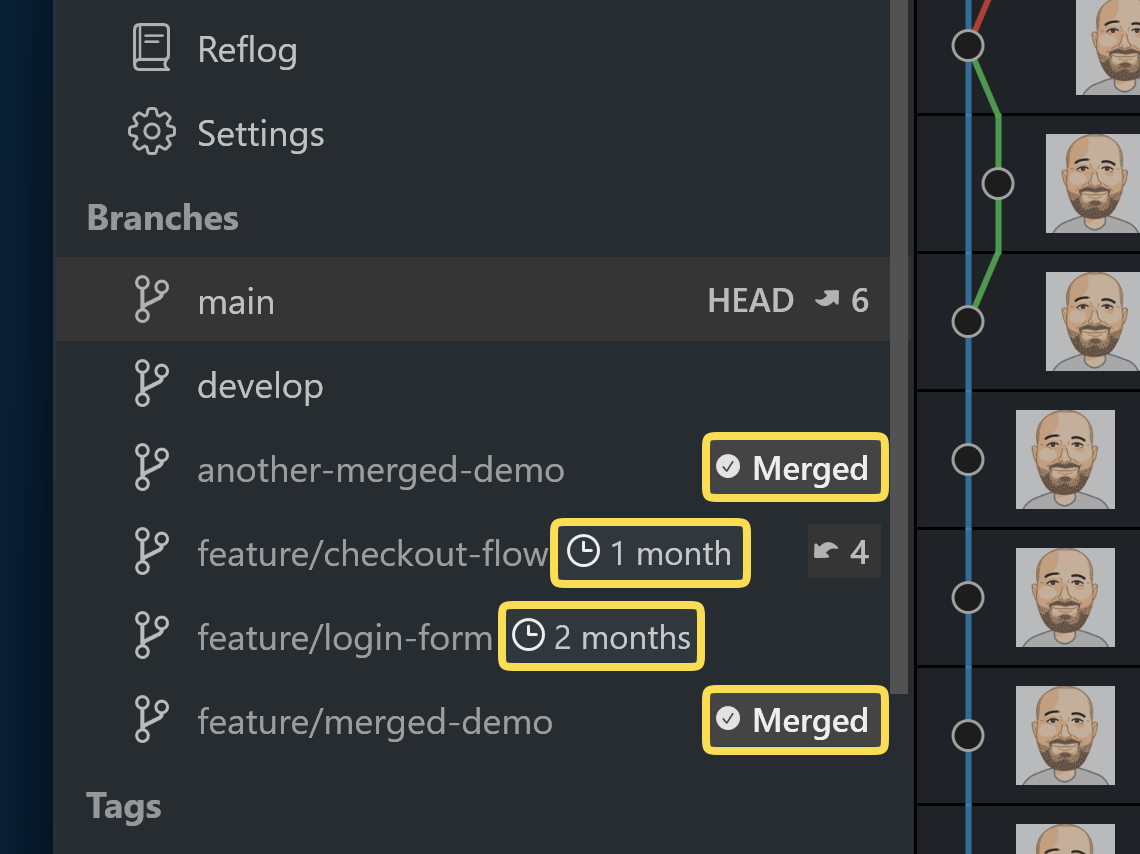
    New "Fully Merged" and "Stale" Badges

    New badges next to branches indicate whether a branch is Fully Merged (all commits integrated into its parent, with the remote branch deleted) or how long it's been Stale.

  3. Automatic Branch Management

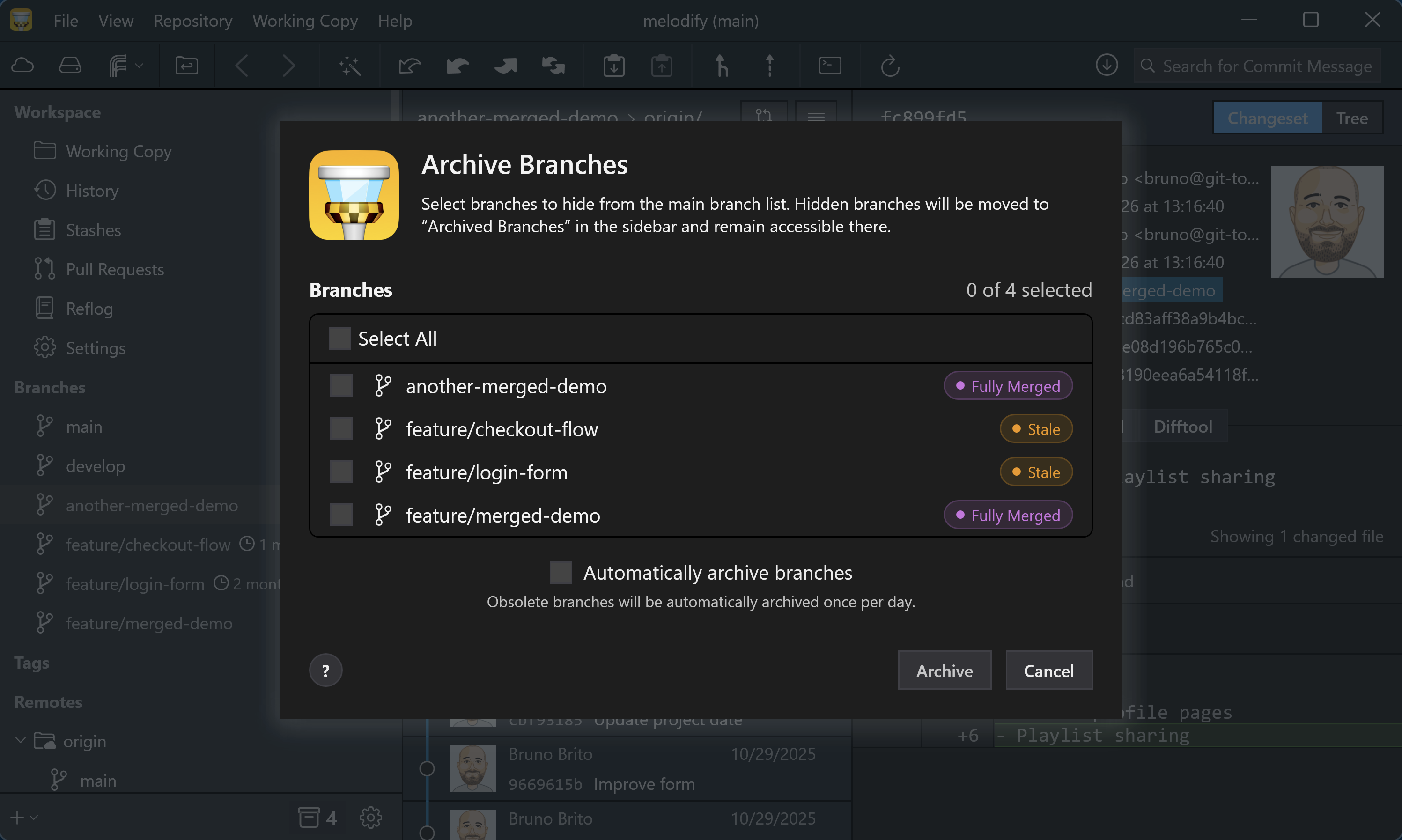
    Automatic Branch Management

    Add branches to the new "Archived Branches" view manually, or let Tower identify and archive stale or fully merged branches for you automatically.

13.2

New

  • History: History now clearly identifies which commits a branch introduces relative to its parent at the fork point.

  • License Account: The redesigned account window now shows license details and lets users manage device activations and invite team members.

  • Tower Pro: Advanced features previously marked as Preview are now included in Tower Pro. Basic users can upgrade within Tower or start a Pro trial. Pro features include Graphite, Stacked Branches, Advanced Custom Workflows, Automatic Branch Management, and self-hosted service accounts.

Improved

  • Compare Tools: Added support for Beyond Compare 5 and improved the configuration of external diff and merge tools.

  • Security: Self-signed certificates are now trusted only for accounts explicitly configured to trust their servers, rather than disabling TLS certificate validation globally.

  • Trial Experience: Improved the trial-expired experience with updated content and recovery options.

  • Performance: Tower no longer waits for service-account refreshes sequentially during startup.

  • History: Improved performance in repositories with large conflicts, where mergeability checks could previously cause Tower to become unresponsive.

  • Services: Improved repository loading across hosted and self-hosted services through server-driven pagination and more reliable redirect handling.

  • Bundled Git: Updated Git for Windows to version 2.55.0.4.

Fixed

  • SSH: Fixed remote operations failing because Git configuration overrides were passed with invalid decorative quotes.

  • OpenSSH: Fixed a crash that could occur when OpenSSH was unavailable, could not be found in PATH, or was only partially initialized.

  • Git Configuration: Fixed a regression that could write literal quotes into committer names, signing configuration, safe directories, commit templates, and other Git settings. Tower also repairs affected values when possible.

  • Compare Tools: Fixed external diff and merge tools failing to launch because their command paths were over-quoted.

  • Changesets: Non-image binary files now display “Binary file differs” instead of an empty diff and no longer trigger repeated Git operations.

  • Bookmarks: Fixed a crash that could occur when the bookmark selection changed while Tower was checking a repository.

  • Branches: Parent branch settings now remain accessible in repositories with many refs. The Set Parent Branch dialog now lists valid candidates and preserves the branch’s stacked state when its parent changes.

  • Graphite: Fixed parent branch validation incorrectly rejecting valid candidates or displaying an empty parent menu.

13.1

Improved

  • Diff View: Diff sections now end with an empty line, providing clearer visual separation.

Fixed

  • Branches: Fully merged branches can now be deleted without displaying an unnecessary warning about unmerged changes.

  • Pull Requests: Fixed a crash that could occur when opening the Changeset tab for a pull request whose branches could not be resolved locally.

  • About: Fixed a crash when opening the Acknowledgements window.

13.0

New

  • Automatic Branch Management: You can now archive fully merged and stale branches manually or let Tower handle them automatically. The sidebar and History view now highlight stale and fully merged branches, with review controls and archive actions integrated into the branch workflow.

  • Pinned Branches: Important branches can now be pinned to a dedicated sidebar section and managed from branch context menus, multi-selection, drag and drop, and branch creation.

  • Working Copy: Untracked files now display their contents directly in the diff view, including text, binary, and image files.

Improved

  • Updates: Tower now uses Velopack for app updates and packaging.

  • Runtime: Tower has been updated to .NET 10.

  • Sidebar: Branch view settings such as grouping refs and stacking branches now live in the sidebar gear menu, making them easier to find while working with branches.

  • Diff View: Long diffs now keep text clear of the overlay scrollbar, so wrapped lines remain readable.

  • History: Branch selection remains responsive while commit history loads.

Fixed

  • Working Copy: Fixed an issue where large diffs could appear truncated until the window was resized.

  • Diff View: The Collapse All button now collapses every file in large commits.

  • History: Compare Branches now handles detached HEAD correctly instead of building an invalid revision range.

  • Repositories: Fixed a crash when opening a freshly initialized empty repository.

  • Branches: Undoing a branch rename now refreshes the sidebar correctly.

  • Branches: Multi-branch delete undo now reports restore failures instead of failing silently.

  • Tags: Multi-tag delete undo now restores all tags correctly and reports any restore failures.

  • Tags: Fixed incorrect context menu items for multi-tag selections.

  • Submodules: Fixed tag checkout and folder picker handling in submodule workflows.

  • Working Copy: The interactive rebase and merge icons in the sidebar now use the correct color in the light theme, making them easier to see when the Working Copy row is not selected.

  • Startup: Fixed a crash that could occur on first launch when Tower could not find an installed Git binary.