Release Notes

New features, improvements, and fixes. Here are the latest Tower updates!

Tower 14

Tower 14 for Windows brings a bird's-eye view of every branch in your repository with the new Branches Review view, plus a much smarter "Fully Merged" detection that finally catches squash and rebase merges.

What's New in Tower 14

  1. Branches Review

    Branches Review

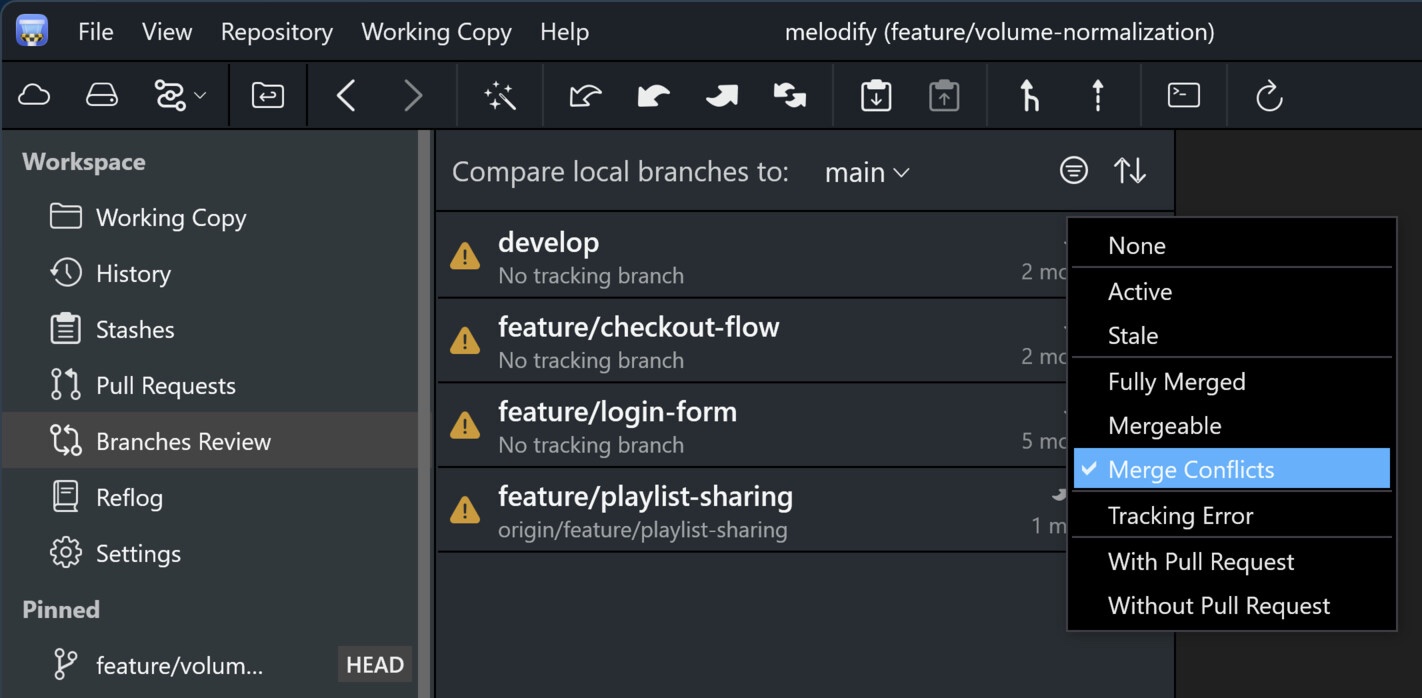
    A new "Branches Review" view puts every branch side by side and compares them against a base branch of your choosing. Sort and filter by Active/Stale, Fully Merged/Mergeable/Merge Conflicts, With/Without Pull Requests, and Tracking Errors to build an instant cleanup list.

  2. Smarter "Fully Merged" Detection

    Smarter "Fully Merged" Detection

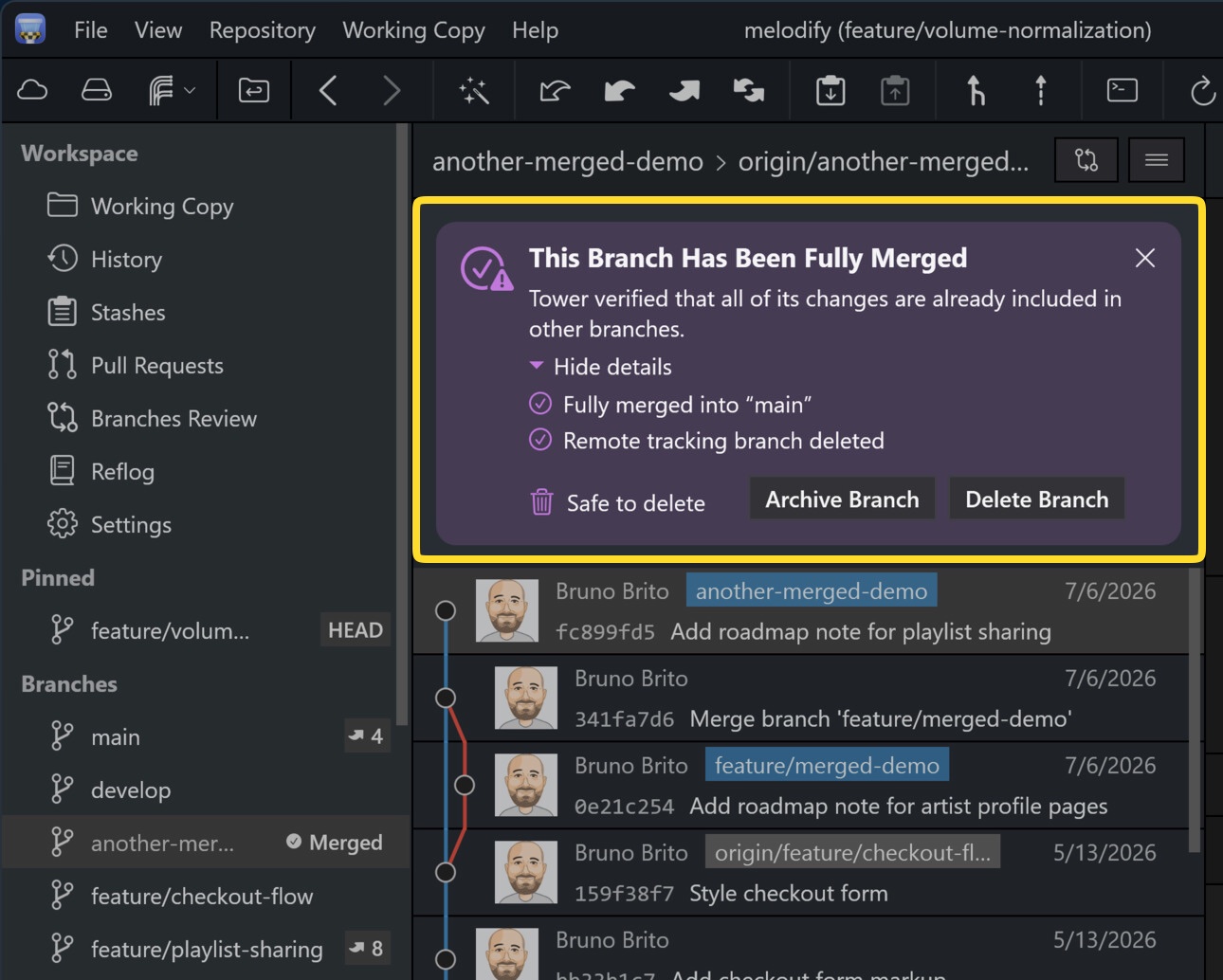
    Tower now runs four independent checks — including matching your branches against merged Pull Requests — to reliably detect branches that were integrated via squash or rebase merges. The redesigned "Fully Merged" hint view shows exactly which checks matched, with direct links to the merge commit or pull request.

  3. View Customization

    View Customization

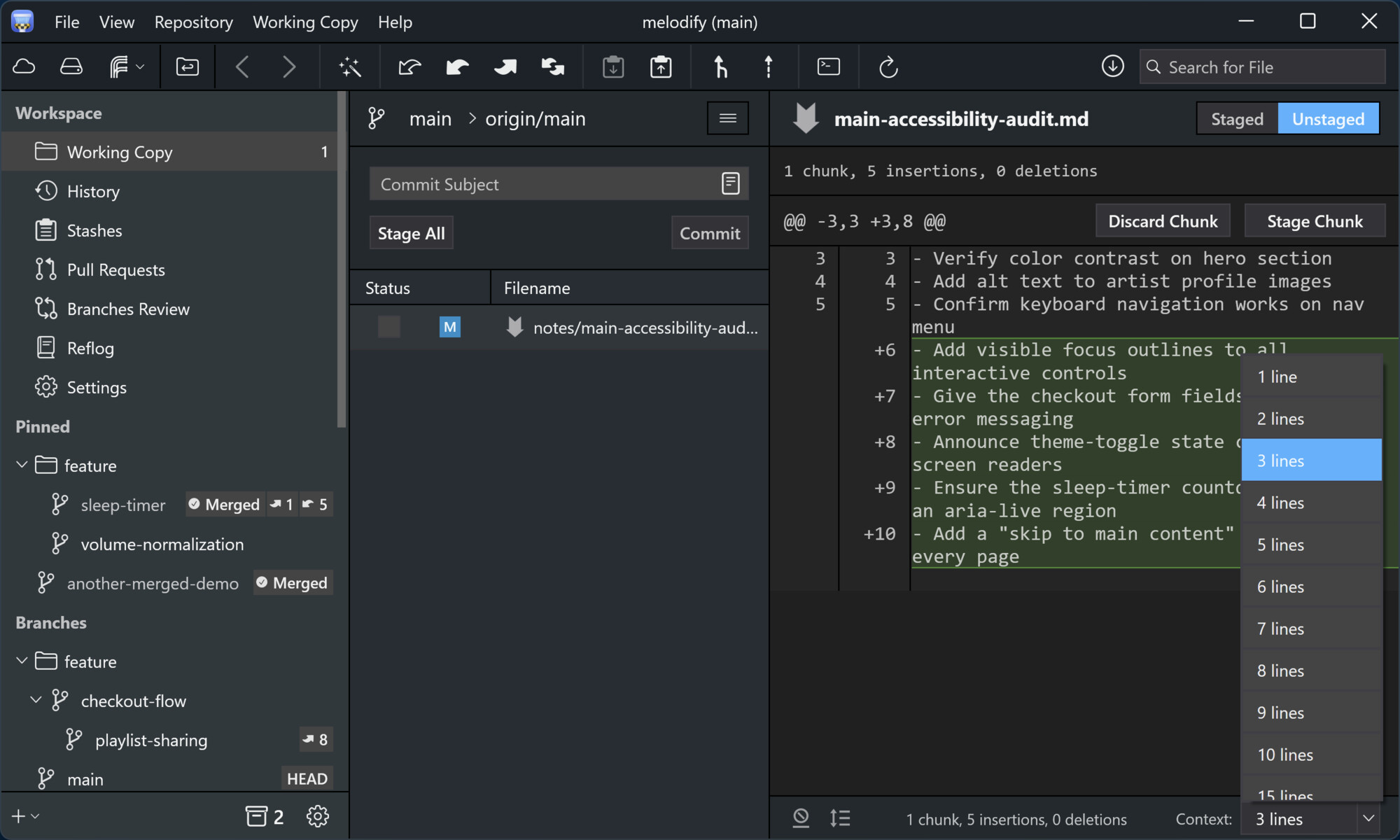
    The gear menu in the sidebar footer now collects all its display settings in one place, with dedicated filter settings for remote branches and tags.

    While inspecting a file diff, the footer on the right also keeps three controls within reach: the context lines shown around each change, a toggle for whitespace-only changes, and a "Complete File" view.

14.2

Improved

  • Working Copy: Improved performance and reduced memory usage when selecting very large files.

  • Branches Review: Switching between branches stays responsive, even when a branch has many commits ahead of its base branch.

  • Branches Review: Reduced memory usage in large repositories. Branches Review now refreshes only when shown and uses a lighter merge check.

Fixed

  • Diff View: Fixed Tower freezing for several minutes after choosing “Show Diff” for a very large diff.

  • Branches Review: Fixed the commit list briefly showing commits from the previously selected branch when switching branches quickly.

  • Services: Fixed missing GitHub, GitLab, and Beanstalk information. Pull requests again show their creation date and open in the browser; comments appear in the correct order; and Beanstalk lists SSH keys.

  • Azure DevOps: Fixed pull requests on Azure DevOps Services being created in the wrong direction—from the base branch into your branch.

  • License: Fixed an outdated “Activation expires” notice that could appear after a license renewal.

14.1

New

  • History: Selecting several commits now shows their combined diff in the detail pane as one changeset across the whole selection, with expandable inline diffs. Review a range of work without stepping through each commit individually.

  • Services: Tower now supports Forgejo and Codeberg accounts. Connect to codeberg.org or your own Forgejo instance to browse, clone, and create repositories. SSH key management is available for Forgejo and Codeberg accounts.

  • Worktrees: Added "Repair Worktree…" for worktrees whose folder was moved. Pick the new location, and Tower reconnects the worktree to its repository and reloads its branches.

Improved

  • Git for Windows: Added support for Git for Windows 2.56.

  • Pro Trial: The title bar badge now shows the remaining days in your Pro trial, includes its expiration date in a tooltip, and can be hidden via View > Hide Pro Trial Badge.

  • Pro Trial: Pro badges now remain visible on Pro features throughout the trial, so you always know which features are part of Tower Pro.

  • Upgrade to Pro: The upgrade window now shows your active Pro trial and its remaining days, instead of saying that a trial will be available again later.

  • Workflows: The Start and Finish actions for topic branches are now available on every plan.

  • Blame: An open Blame window now follows new commits and branch switches. Failed blame operations now show an error instead of an empty window.

  • Git: You can now skip a bundled Git update permanently.The startup dialog includes a "Skip This Version" button, while "Not Now" asks again on the next start. Tower will ask again when a later update includes a newer Git version.

Fixed

  • Repositories: A repository created from the “Create Repository” offer now opens immediately instead of only being added to the sidebar.

  • Pull Requests: Fixed a crash in GitHub repositories with more than 100 open pull requests. GitLab now also lists all open pull requests.

  • Pull Requests: Fixed a stale “conflicts must be resolved” banner that could persist after a fetch. The “behind” count for Update Branch now also remains correct after the branch moves.

  • Worktrees: Fixed a crash when right-clicking a broken worktree in the sidebar.

  • Worktrees: Fixed a crash when opening a worktree whose folder was deleted or whose main repository was moved.

  • Working Copy: Fixed a crash when discarding local changes that include a staged rename.

  • Working Copy: Fixed a crash while rebasing when a step removed a submodule.

  • History: Fixed a crash when opening the diff tool with no commit selected.

  • Clone: Fixed the second line of each entry in the Cloned Remote Repositories popup being cut off.

  • Command Line: Tower.exe -o now offers to create a repository when the specified folder is not one. It also reuses an already open repository instead of opening it twice.

  • Stability: Fixed crashes that could occur while cloning or removing a repository, shortly after launch, or while Tower redrew its icons.

  • Graphite: Fixed an empty, disabled "Parent Branch" submenu showing for branches Graphite does not track.

14.0

New

  • Branch Review: Review all local branches against a selected base branch in a dedicated workspace, with ahead/behind counts, merge status, pull request details, filters, inline changes, and branch actions.

  • Fully Merged Detection: Tower now detects branches merged through Git ancestry and merge commits—and, in Tower Pro, through merged pull requests—reliably catching squash and rebase merges that Git ancestry alone can miss.

  • Fully Merged Hints: Branch hints now explain why Tower considers a branch merged, with direct links to supporting evidence and a “Don’t Show Again” option.

  • Title Bar: License and update notices now appear in the window title bar, keeping the toolbar focused on repository actions.

  • App Icon: Tower now uses an updated app icon.

  • Working Copy: Diffs now include a footer with a change summary, context-line controls, an option to hide whitespace-only changes, and an option to display the complete file.

Improved

  • Services: Improved service account refreshes for a more responsive experience.

  • Sidebar: The Branches group context menu now more closely matches Tower for Mac, including direct branch-creation actions.

  • View Customization: Customize the sidebar, History, and diff views with options for branch and tag display, remote-branch filters, stash counts, and diff context lines.

  • Bundled Git: Updated Git for Windows to version 2.55.0.5.

Fixed

  • Bitbucket: Fixed OAuth account refreshes, cloning, fetching, and pushing failing when newer Bitbucket tokens exceeded the Windows Credential Manager size limit.

  • Services: Fixed crashes while refreshing service repository lists and when Azure DevOps returns incomplete pull request data.

  • Diff View: Fixed newly staged files sometimes opening with their first lines cut off.

  • Graphite: Graphite branches with a parent now offer the “Unset Parent Branch” quick action.

  • Trial Registration: Tower now shows the available next steps when a trial has expired instead of leaving registration stuck.