Release Notes

New features, improvements, and fixes. Here are the latest Tower updates!

Tower 5

Our latest update introduces an enhanced commit composition experience. Now, you can easily reference commits, files, and issues in your commit messages. Additionally, the editor is customizable, enabling you to define your preferred character limits and choose between soft or hard line wrappings.

Watch this 3-minute video to learn everything that is new in Tower 5 for Windows!

What's New in Tower 5

  1. Autocomplete for Commit Messages

    Simply type "/" in the subject or body field to reference files, commits, and issues.

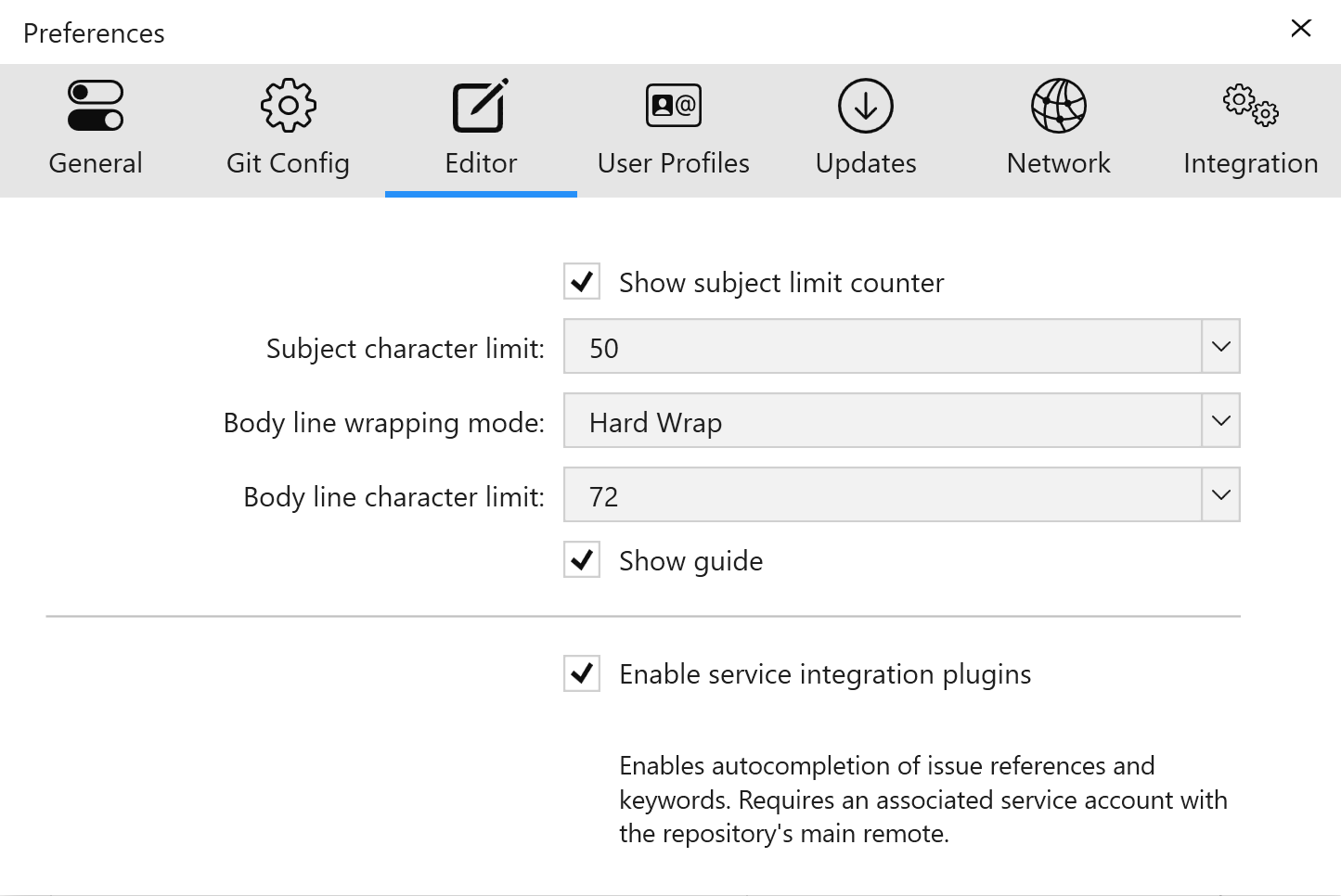
  2. The New "Editor" Tab

    The New "Editor" Tab

    Your team's commit conventions can now be easily followed by adding a character limit and choosing between soft or hard wrapping modes.

5.5

Fixed

  • Clone URLs for GitLab repositories are now appropriately constructed.

  • An application crash that could happen while adding or editing service accounts shouldn't be a problem anymore.

  • Despite successful authentication, the GitHub service account couldn't be created or modified in specific scenarios. That has been fixed.

  • Dragging multiple bookmarks could cause an application crash - we also fixed that.

5.4

Fixed

  • Authentication for Azure DevOps and Beanstalk accounts might not work correctly in certain scenarios - this has been fixed.

  • The selected “Allowed signers file” in the Repository → Settings view might display incorrect values - it's been fixed as well.

5.3

New

  • Detection of HTTPS authentication errors has been added - we now provide an option to enable the “Use Git Credential Manager” setting and retry the remote operation.

Fixed

  • The application might crash upon unsuccessful retrieval of the GPG signing keys. It’s fixed now.

  • Services -> Git connection settings: adding SSH keys from a path containing spaces is no longer an issue.

  • We fixed a potential crash when editing the remote repository settings.

  • “Preferences → Git Config → HTTPS: Use Git Credential Manager” is now enabled by default.

  • SSH key-based custom accounts should now work as expected.

  • Recently cloned repositories popup: The “Clear” button sometimes gets stuck in a disabled state - this should not happen anymore.

  • Saving Azure DevOps Server credentials is now working as expected.

  • Azure DevOps account view: The “Open” button was missing for cloned repositories - this has been fixed.

5.2

New

  • SSH Signing: You can now sign commits and tags using your SSH key, see which commits have been signed and by who, and connect SSH keys with your User Profiles - all right from within Tower.

  • SSH Authentication: Authentication is now possible using the Embedded SSH Agent, a Custom SSH Agent, OpenSSH and 1Password. You can set your preferred option in Preferences → Git Config → SSH.

  • HTTPS Authentication: Tower can now handle HTTPS Authentication using Git Credential Manager. You can enable this in Preferences → Git Config → HTTPS.

  • Undo: It is now possible to undo the “Reset to Revision” action.

Improved

  • Merge Wizard: A tooltip has been added to show the full tag name for each version.

  • Diff Tools: Meld and KDiff3 can now be detected at C:\Program Files.

  • Bookmarks: When adding a repository from an “unsafe” directory, Tower now offers a dialog to add the path automatically to .gitconfig.

Fixed

  • In some cases, scrolling commits after a search cleared the commit list. This is now working as expected.

  • The Undo commit action now restores the commit message.

  • The “Show only conflicts” setting was reset after merging multiple times. This has been fixed.

  • Opening a repository from the File menu or using a shortcut is now working as expected.

  • We fixed a crash that occurred when deleting multiple repositories from the Bookmarks.

  • The “Remind me later” button on the update dialog is now working as expected.

  • File names containing special characters are now displayed correctly in the Working Tree view.

  • A potential crash, that could occur during changing branches, has been fixed.

  • We fixed an occasional crash that could happen when the “Auto-expand with threshold” option was enabled.

5.1

Improved

  • Performance: We optimized the processing of large diffs, resulting in significantly improved performance and shorter loading times.

  • Performance: Some background operations have also been optimized for the Services View in order to provide a faster UI and better error handling.

Fixed

  • The Ctrl + Enter shortcut for the commit subject field is now working as expected.

  • A misleading message asked the user to update the Git binary when in fact a newer version was installed. This has now been fixed.

  • A potential crash when updating OAuth tokens for GitHub service accounts has been fixed.

5.0

New

  • Improved Commit Composing: Tower’s commit message fields have just become a lot smarter! This release brings improvements that make commit composing a seamless experience. Read on to find out more…

  • Issue Numbers: You can now search for and autocomplete issue numbers in your commit messages. Simply type the “#” symbol from the subject or body field to find the required issue number. (This feature requires an associated service account in order to work.)

  • Commit References: Just like issue numbers, you can search for and autocomplete commit references by typing “c:”. (This feature requires an associated service account in order to work.)

  • fixup! and squash!: It is now possible to search and autocomplete Git's “fixup!” and “squash!” conventions within a commit's subject, allowing you to easily amend any commit down the history. When commits whose subject start with “fixup!” or “squash!” are detected in the current HEAD branch History, an action will be offered to “autosquash” them. This will automatically fixup or squash these commits.

  • Autocomplete Service Keywords: Service-specific issue keywords (closes/fixes/resolves) can also be autocompleted.

  • Autocomplete Changed Files: Changed files from the working copy can now be searched and quickly inserted by typing .

  • Command Help: You can type the “/“ character to see a list of the above commands available for each field.

  • Hard Line Wrapping: You can now configure a character limit for the commit message body in Tower’s Preferences -> Editor. This will show as a guide when composing the body.

  • Keyword Highlighting: Keywords (such as commit hashes, issue numbers, and the fixup! and squash! expressions) are now automatically highlighted both in the commit title and body fields.

  • Scrollable and Resizable Text Field: The commit message body field can now be scrolled and resized.

Improved

  • Commit Composing: Hitting ”Enter” in the subject field will now take you to the body field.

  • Performance: We have improved the performance of the app when switching between commits with large changesets.

Fixed

  • Fixed a certificate file location error that was preventing execution of remote commands (pull, push, clone, etc.) when using Git binaries v2.40