Conventional Commits Template
Conventional Commits is a published specification that adds a machine-readable prefix to the subject line: a type such as feat or fix, an optional scope, and a description. Because the structure is predictable, tools can generate changelogs and determine semantic version bumps from your history.
- You want to generate changelogs or release versions automatically.
- Your project or organization has already adopted the specification.
- You want a shared vocabulary for kinds of change across many contributors.
Template
Replace each <placeholder> by hand when you write a commit.
Lines starting with # are guidance that Git removes in its default cleanup mode.
Completed example
A new feature in a web app's search, linked to an issue.
feat(search): support filtering commits by author

Add an "author:" prefix to the commit search field. Matching is
case-insensitive and accepts either a name or an email address.

Refs: #482
Guidance
Rules
Based on Conventional Commits 1.0.0. Refer to the original guide for the full convention.
- The subject must start with a type, followed by an optional scope, an optional
!, and a required colon and space. - Use
featwhen the commit adds a new feature andfixwhen it fixes a bug. - Other types are allowed. The specification does not define them; many teams use the set from the Angular convention (
build,chore,ci,docs,perf,refactor,style,test). - A scope, if present, is a noun in parentheses describing a section of the codebase, e.g.
fix(parser):. - The description immediately follows the colon and space and summarizes the change.
- The body begins one blank line after the description and may contain several paragraphs.
- Footers begin one blank line after the body. Each uses
Token: valueorToken #value, and tokens use-instead of spaces (e.g.Reviewed-by). - Mark breaking changes with
!before the colon, aBREAKING CHANGE:footer, or both. The footer token must be uppercase;BREAKING-CHANGEis equivalent. - For semantic versioning,
fixmaps to a patch release,featto a minor release, and any breaking change to a major release.
Optional fields
- Scope
- A noun in parentheses naming the affected area, such as
(parser). Omit it together with the parentheses. - Body
- Free-form explanation of the change. Starts one blank line after the description.
- Footers
- Trailer-style lines such as
Refs: #123orReviewed-by: Name, one blank line after the body. - !
- Only for breaking changes. Place it directly before the colon.
Common mistakes
- Forgetting the space after the colon (
feat:add). - Using
featfor internal refactoring that adds no user-facing capability. - Marking a breaking change only in the body text, where tools won't detect it.
- Leaving empty parentheses when there is no scope.
- Inventing a new type per commit instead of agreeing on a list with your team.
How it relates to other templates
Conventional Commits can carry the content of other templates. A bug fix can use a fix: subject with the Bug Fix body sections, a performance change can use perf:, and the Breaking Change template already uses ! and the BREAKING CHANGE: footer. For reverts, the specification's FAQ suggests a revert: type with a Refs: footer listing the reverted commits.
Use this template
Use in Tower
Tower for Mac
- Open Tower's Settings and select the Templates tab.
- Create a new template and enter the subject and body below. You can also download the template file and import it from the same tab. After importing, remove the lines that start with
#. They're guidance for Git's editor. - To use it by default, set it as the global Git value in the Templates tab, or pick it as the default commit template in a repository's settings.
- When you write a commit, click the Commit template button below the description field, or type t: or / in the subject field to choose a template.
More details: Commit Templates in the Tower for Mac documentation.
Tower for Windows
- Open Tower's Preferences and select the Templates tab.
- Click + to create a new template and enter the subject and body below.
- To use it by default, set it as the global default template, or pick it as the default in a repository's settings.
- When you write a commit, click the Commit template button in the commit composer, or type t: or / in the subject field to choose a template.
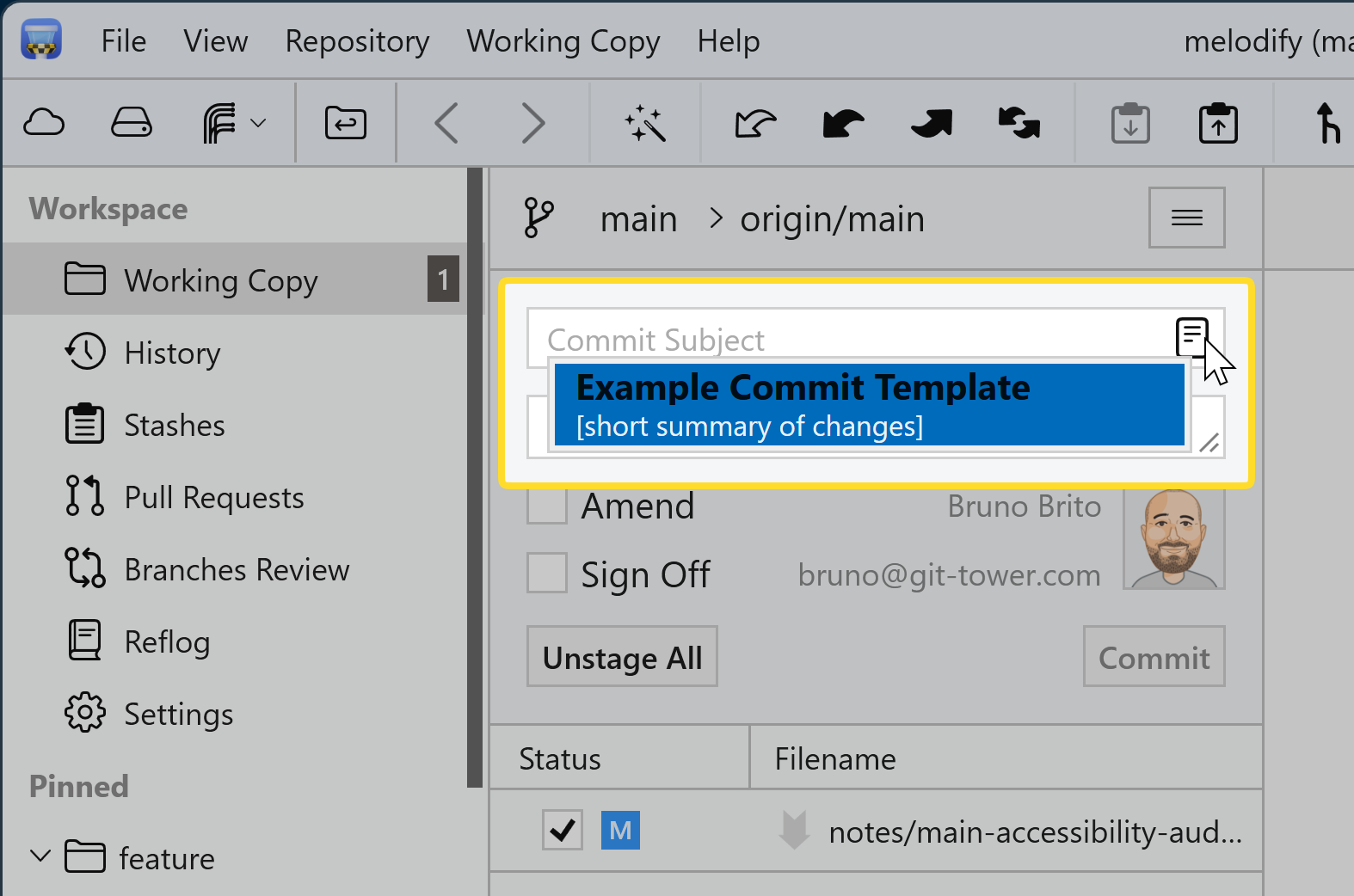
More details: Commit Templates in Tower for Windows.
Template fields for Tower
The library version with Git's # comment lines removed. If you edited the template above, copy your version from the editor instead.
Subject
<type>(<optional scope>): <description>Body
<Optional body: explain what changed and why.>

<Optional footer(s), e.g. Refs: #123>Use with the Git command line
Download gitmessage-conventional-commits.txt
The commands below assume the file is in your Downloads folder.
macOS and Linux (Terminal)
Try it once
Run this in a repository with staged changes. Git opens your editor with the template filled in:
git commit --template ~/Downloads/gitmessage-conventional-commits.txtMake it the default for one repository
From the repository's root folder, save the file as .gitmessage and point Git to it:
mv ~/Downloads/gitmessage-conventional-commits.txt .gitmessage
git config commit.template .gitmessageMake it your global default
Save the file in your home folder and use it for every repository without its own setting:
mv ~/Downloads/gitmessage-conventional-commits.txt ~/.gitmessage
git config --global commit.template "~/.gitmessage"Windows (PowerShell)
Try it once
Run this in a repository with staged changes. Git opens your editor with the template filled in:
git commit --template "$HOME\Downloads\gitmessage-conventional-commits.txt"Make it the default for one repository
From the repository's root folder, save the file as .gitmessage and point Git to it:
Move-Item "$HOME\Downloads\gitmessage-conventional-commits.txt" .gitmessage
git config commit.template .gitmessageMake it your global default
Save the file in your home folder and use it for every repository without its own setting:
Move-Item "$HOME\Downloads\gitmessage-conventional-commits.txt" "$HOME\.gitmessage"
git config --global commit.template "~/.gitmessage"Share it with your team
Commit .gitmessage to the repository so everyone has the same file. Sharing the file does not configure anyone's Git: Git never applies settings from a repository automatically, so each teammate runs this once in their clone:
git config commit.template .gitmessageInspect, change, or remove the default
# Show the configured template and where it's set
git config --show-origin --get commit.template

# Point to a different file
git config commit.template path/to/other-template.txt

# Remove the repository or global setting
git config --unset commit.template
git config --global --unset commit.template- Templates guide, hooks enforce. A template only pre-fills the editor. To reject messages that don't follow a convention, add a commit-msg hook.
- Only the editor uses templates.
git commit -mandgit commit -Fbypass the template. - Unchanged templates abort the commit. If you save without editing the template, Git stops with "you did not edit the message".
- Comment removal depends on cleanup. Git strips
#lines under its defaultstripcleanup mode. With--cleanup=verbatim,--cleanup=whitespace, or a matchingcommit.cleanupsetting, they stay in the message. If you changedcore.commentChar,#lines aren't treated as comments. - Other commands write their own messages.
git revertandgit mergedon't loadcommit.template.
Setting up Git from scratch? The Git Config Generator builds a complete .gitconfig for you. See the git commit documentation for all options.
Use with coding agents
This skill teaches your coding agent to draft commit messages in the Conventional Commits format, following the published Conventional Commits 1.0.0 convention. It uses the library version of the template. Edits you make in the editor above aren't included.
- Follows your repository's instructions and your explicit requests first.
- Reads the staged changes and keeps unstaged work out of the message.
- Never invents motivation, issue numbers, benchmarks, or test results. It leaves placeholders and asks instead.
- Flags breaking changes and unrelated changes that should be split.
- Drafts only. It won't stage, commit, or push unless you ask it to.
Download skill commit-message-conventional-commits-v1.0.0.zip · Agent Skills format · MIT-0 license
Contains commit-message-conventional-commits/SKILL.md with the instructions, references/REFERENCE.md with the rules and a completed example, and assets/template.txt.
Install in Claude Code
- Unzip the download. It contains a single folder named after the skill.
- Move that folder to
.claude/skills/in your repository to share it with your team, or to~/.claude/skills/to use it in all your projects. - Start a new Claude Code session and ask it to draft a commit message. You can also invoke the skill directly with
/commit-message-conventional-commits.
See the Claude Code skills documentation for details.
Other agents
The package uses the open Agent Skills format, but we've only tested the agents listed above. For any other agent, check its documentation for skill support, or add the instructions below to its configuration file, such as AGENTS.md.
Copy the instructions
Add these instructions to your agent's configuration or your repository's AGENTS.md:
## Commit messages

Follow the Conventional Commits 1.0.0 convention (https://www.conventionalcommits.org/en/v1.0.0/).

```text
<type>(<optional scope>): <description>

<Optional body: explain what changed and why.>

<Optional footer(s), e.g. Refs: #123>
```

Rules:
- The subject must start with a type, followed by an optional scope, an optional `!`, and a required colon and space.
- Use `feat` when the commit adds a new feature and `fix` when it fixes a bug.
- Other types are allowed. The specification does not define them; many teams use the set from the Angular convention (`build`, `chore`, `ci`, `docs`, `perf`, `refactor`, `style`, `test`).
- A scope, if present, is a noun in parentheses describing a section of the codebase, e.g. `fix(parser):`.
- The description immediately follows the colon and space and summarizes the change.
- The body begins one blank line after the description and may contain several paragraphs.
- Footers begin one blank line after the body. Each uses `Token: value` or `Token #value`, and tokens use `-` instead of spaces (e.g. `Reviewed-by`).
- Mark breaking changes with `!` before the colon, a `BREAKING CHANGE:` footer, or both. The footer token must be uppercase; `BREAKING-CHANGE` is equivalent.
- For semantic versioning, `fix` maps to a patch release, `feat` to a minor release, and any breaking change to a major release.
- Before choosing types, check the repository for an existing list (commitlint config, CONTRIBUTING, recent history) and use it.
- Choose feat only for new user-facing capability and fix only for bug fixes; otherwise use the best-matching agreed type.
- Derive the scope from the area the staged changes touch, following scopes used in recent history. Omit the scope when there is no clear single area.
- If a public API, configuration format, CLI flag, or default behavior changes incompatibly, add ! and a BREAKING CHANGE footer.

When writing a commit message:
- Base it on the staged changes (`git diff --staged`). Don't describe unstaged work as part of the commit.
- If the staged changes are unrelated to each other, suggest splitting the commit.
- Never invent motivation, issue identifiers, benchmark numbers, or test results. Keep a `<placeholder>` and ask instead.
- Call out breaking changes and include migration information supported by the changes.
- Draft the message for review. Don't stage, commit, or push unless explicitly asked.